




A wired IEM (In-Ear Monitor) setup is supposed to be the low-drama option. You plug in, press play, and your audio behaves the same way every time. No pairing loops, no battery anxiety, no “why did it switch devices” moment right in the middle of a call.
And yet the most common complaints people have about IEMs are not really about the earphones. They’re about the cable — the part that gets bent in pockets, scraped across desk edges, pulled when you stand up, and then expected to act flawless the next day. The sound can stay consistent for years while the experience becomes less consistent because of tiny interruptions that pile up.

If you’ve ever had a channel dip for half a second when you turn your head, or heard a sudden thump in your ears because the cable tapped your jacket, you’ve already met the two recurring culprits: contact stability and mechanical wear.
Why cable issues feel random (even when they aren’t)
Most cable failures happen at predictable stress points, but you only notice them when your routine triggers the weak spot.
The three everyday moments that usually reveal the problem
There are a few situations that show up again and again:
- You shift in your chair and feel a tug at one ear.
- You stand up, the cable scrapes your hoodie, and you hear that thump again.
- You turn your head during a call and one channel dips, then returns as if nothing happened.
If your IEMs sound fine when you sit still but become unreliable with movement, the driver is rarely the issue. It’s almost always the cable, the connector fit, or wear near the plug.
Where wear builds up in real life
Cable problems tend to concentrate in three places:
- Near the plug — where the cable bends sharply in pockets or gets pressed against a desk edge.
- Near the split and jawline area — where small posture changes create thousands of flex cycles over time.
- At the connector end — where repeated insertion and tiny movements gradually change tolerances and contact quality.
2-Pin vs MMCX: the connector basics without hype
Before you replace anything, confirm what connector your IEM uses. The correct choice is simply the one your model is built for.
2-pin (often 0.78mm)
2-pin connectors use two small pins and a fixed contact. When properly seated, they can feel stable and predictable. The trade-off is alignment. You want to attach them straight and gently. If you push at an angle, pins can bend, and even a slightly imperfect seat can turn into intermittent contact when you move.
MMCX
MMCX connectors rotate. That can make them convenient for daily attaching and detaching, and there are no pins to align. The trade-off is long-term wear. With heavy use, MMCX can loosen slightly, and then dropouts can appear when the cable shifts.
How to identify your connector quickly
- If the connector rotates freely, it’s almost always MMCX.
- If it doesn’t rotate and looks like a two-pin arrangement, it’s 2-pin.
- If you’re unsure, search your exact IEM model name + “connector type.” It’s usually documented.
Why channels drop out when you move your head
A channel that cuts out during a head turn is not a mysterious “sound quality” flaw. It’s a stability problem, and it’s usually fixable.
Partially seated connectors and micro-movement
A connector can make contact while you’re still, then lose it with tiny movement. With 2-pin, this can happen if the connector isn’t fully seated or is slightly angled. With MMCX, it can happen if the fit has loosened and the connection “floats” a little under motion.
Loose MMCX vs misaligned 2-pin (how it feels)
MMCX looseness tends to feel obvious: rotation becomes too free, and dropouts appear when the cable shifts. With 2-pin, it can be subtler: the cable looks attached, but contact isn’t perfectly even, so movement interrupts it briefly.
Cable fatigue near the plug (the classic failure point)
If a dropout or crackle happens when the cable flexes near the plug, you’re likely dealing with conductor fatigue at a stress point. This is where strain relief matters. Poor strain relief concentrates stress in one sharp bend. Good strain relief spreads it over a wider section and buys time.
Quick troubleshooting before you buy anything
You can narrow the cause down quickly with a few simple checks.
The reseat test
Detach and reattach the cable carefully. With 2-pin, align first and insert straight. With MMCX, you should feel a firm click when it seats. Then play audio and gently move your head and the cable near the connector. If the issue disappears after reseating, contact was the likely culprit.
The plug-end flex test
Play audio at low volume and gently flex the cable near the plug. If crackling appears, or a channel drops, the cable is likely fatigued there.
Microphonics vs electrical dropouts
Microphonics is mechanical noise: taps, thumps, and scraping transmitted through the cable when you move, especially while walking. Electrical dropouts are channel cuts, fades, or crackles that happen with movement or flex. Both point to the cable, but not the same fix: routing and softer jackets help microphonics, better contact and healthier conductors help dropouts.
What to look for in a daily-use cable
If you do replace the cable, the most useful “upgrade” is the one that removes friction in everyday use.
Fit, repeatability, and strain relief
Start with the correct connector type. Then focus on a repeatable fit that feels secure without fiddling, solid strain relief near the plug, and a cable that stays comfortable around the ear.
Flexibility and microphonics control
If you walk or commute with IEMs, cable noise can become the main annoyance. A more flexible jacket tends to be more comfortable and transmits less noise, especially when it rubs against clothing.
Match the length to your routine
Desk use and commuting stress cables differently. Longer cables can be noisy and annoying on the move. Shorter ones can feel restrictive at a desk. Choose what fits how you actually listen.
Where to start comparing options
Most 'random' cutouts are not random at all. They are usually a contact issue: 2-pin vs MMCX fit, slight looseness over time, or a connector that isn't seated. If one channel dips when you move your head, it's a strong signal to check the connector type and reseat the cable before blaming the earphones. If you want a reference point while you compare connector types and narrow down what fits your IEM, start with an IEM cable connector guide.
Final note: treat the cable like maintenance, not a mystery
A wired setup is often chosen because it feels calm and predictable. When the cable starts adding small distractions, the whole system becomes less “just works,” even though the IEM drivers may still be perfectly fine.
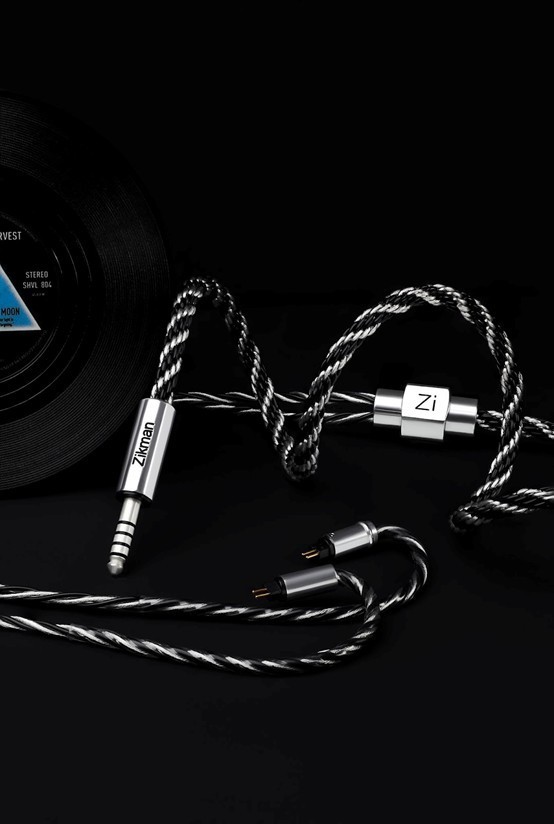
Once you confirm whether you’re dealing with 2-pin or MMCX, and you prioritize stable fit and strain relief, the decision becomes practical rather than emotional. You stop guessing, you fix the simplest failure point first, and the setup goes back to what it was meant to be: reliable, steady, and easy to live with. If you'd rather begin with a handcrafted-cable brand before comparing other options, Zikman Audio is worth bookmarking.

What's your reaction?
You may also like
-

9 Essential American Dream Auto Warranty Facts to Know
-
Weight Loss under Professional Supervision: An Overview of Treatment Using Ozempic
-
Acne treatment: what works and what to expect
-
IVF, explained the way you’d want it explained
-
Hair restoration: what works and what to expect
-
How to Design Custom T-Shirts for Business Apparel


Comments
0 comment