




In 2026, moving data quickly is no longer just a technical detail, it is the key to getting work done. Whether you’re a designer handling huge files or a manager leading a remote team, you need a network file transfer software that is fast and reliable.
While the market is full of old tools, AnyViewer has claimed the top spot by mixing high-level security with simple design. This guide breaks down why AnyViewer is the undisputed best network file transfer software for the modern era, successfully evolving from a simple free remote desktop software into a complete data management powerhouse.
Key Features That Make AnyViewer Special
Why is AnyViewer the top choice for users everywhere? It’s simple: it combines powerful "under-the-hood" technology with a design that anyone can use, no IT degree required.
1. Lightning-Fast Speed (No More Waiting)
In our busy world, every second counts. While other apps might crawl along, AnyViewer uses special "data-shrinking" technology (compression) to keep things moving fast.
What this means for you: You can reach speeds of up to 10MB/s.
The real-world result: Instead of waiting all afternoon to send a massive folder, you can finish the job in the time it takes to make a cup of coffee. It is built for people who need efficient network file sharing software.
2. Heavy-Duty Support (Send Everything at Once)
Most "free" apps block you the moment you try to send a large file, usually cutting you off at 2GB. In 2026, when a single high-definition video can be 10GB or more, those old limits just don't work.
What this means for you: AnyViewer handles massive files up to 2TB.
The real-world result: Whether you are sending a giant backup of your entire computer or a massive database for work, you won’t get an "Error: File too large" message. Just click send and relax.
3. Bank-Level Security (Your Data, Your Eyes Only)
When you send personal or work files over the internet, you want to be sure nobody is "snooping" on them. AnyViewer uses ECC 256-bit encryption, which is a fancy way of saying it turns your data into an unbreakable code.
What this means for you: It uses the same security standards that big banks use to protect your money.
The real-world result: Your files are wrapped in a digital "vault" while they travel. Not even the people at AnyViewer can see what’s inside. It’s total privacy from start to finish.
4. Works on All Your Devices (Ultimate Flexibility)
We don’t just use one computer anymore. Most of us jump between a laptop, a phone, and a tablet. AnyViewer acts as a "universal bridge" that connects all of them.
What this means for you: It works perfectly across Windows, Mac, iPhone, and Android.
The real-world result:
l Left a document on your Office PC? Grab it using your Phone while on the bus.
l Need to move a project from your MacBook to a friend’s Windows laptop? It’s done in two clicks.
l It doesn't matter what brand of device you use; AnyViewer makes them all talk to each other perfectly.
A 3-Step Guide to Transfer Files
AnyViewer eliminates the technical steepness usually associated with professional network file sharing software.
Step 1. Link Your Devices: Install AnyViewer on both endpoints and sign in to a single account to pair them instantly.
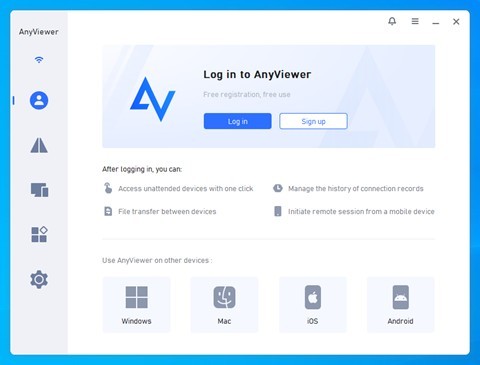
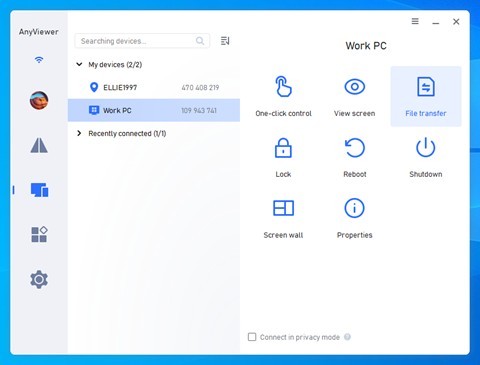
Step 2. Select Your Target: In the "Device" menu, choose your remote machine and click the "File Transfer" icon, no need to start a full remote session.
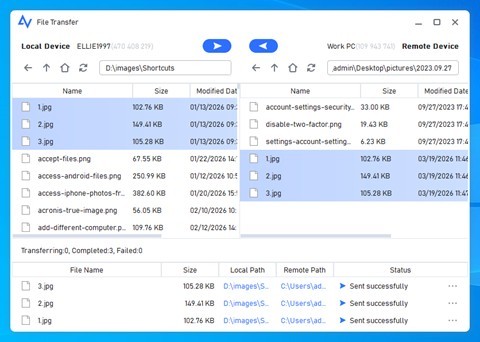
Step 3. Select and Send: In the File Transfer Manager, use the left side for your local files and the right side for remote files. Pick what you want to move and click the arrow. A progress bar will show you exactly when it's done.
Conclusion
In 2026, efficiency is the only true competitive moat. Using fragmented or sluggish tools for data movement isn't just an inconvenience; it’s a security risk and a productivity killer. By choosing AnyViewer, you are adopting a high-speed, ultra-secure network file transfer software designed to scale with your ambitions.
Stop compromising on speed and security. Experience the future of data mobility with AnyViewer today.

What's your reaction?
You may also like
-

Why Small Roofing Problems Can Become Harder to Diagnose When Homeowners Delay Repairs
-
Planning a Stair Lift for Shared Homes Without Disrupting Everyday Staircase Use
-
Managing Household Waste During Large Decluttering Projects Without Creating New Clutter
-
How to Plan Impact Door Installation Around Security, Access, and Everyday Household Routines
-
How Commercial Roofing Maintenance Planning Helps Property Managers Track Roof Conditions
-
Designing Privacy Around Street-Facing Windows Without Giving Up Useful Natural Daylight











Comments
0 comment