




What Makes E-commerce Product Images Stand Out?
Great product photos are never a matter of chance; they are typically the result of careful composition, lighting, and post-processing. They usually serve a single core purpose: to clearly and intuitively convey the product’s value. Here are the key elements that make product photos stand out:
l Focus on the product - A cluttered background can easily distract potential buyers. Most successful e-commerce photo editing tend to use clean, minimalist backgrounds.
l Proper lighting & exposure - While natural light can produce good results, controlled studio lighting ensures consistency in the image style. Harsh shadows or overexposed highlights often lead to lower conversion rates.
l High resolution & sharpness - Blurry images often give the impression of “unprofessionalism.” Harsh shadows or overexposed highlights may result in low conversion.
l Consistent style across listings - If your store pages appear disjointed or cluttered, the overall visual effect will seem chaotic and disorganized.
l High-quality retouching - Careful image editing ensures that products appear visually realistic and true to life, effectively reducing the likelihood of customer dissatisfaction or returns due to discrepancies between the actual product and the image.
Best Tools for E-commerce Product Photography Improvement
Now that you know what makes a great product image, what to do next is to choose the right tools to bring your visuals to life. Below are 3 powerful tools that can significantly boost your E-commerce product photography.
Option 1. UltraPic
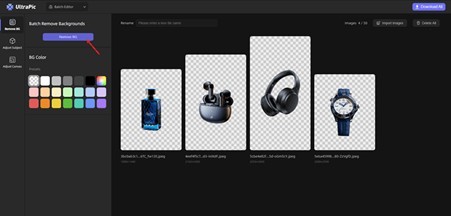
UltraPic is an AI-powered online tool designed to simplify product photo enhancement. It focuses on automation, allowing users to edit images with minimal effort.
Instead of manually adjusting every detail, UltraPic analyzes your image and applies intelligent edits. This makes it particularly useful for small business owners, freelancers, and anyone managing large product catalogs. Features of UltraPic include:
l Automatic background removal for clean product isolation
l AI-driven lighting and color correction
l High-quality edge refinement for precise cutouts
l Fast processing for batch editing
l Studio-grade background generation
l One click photo retouching like removing blemishes and fixing wardrobe malfunctions
▶Compatible Platforms: Web-based (works on Windows, macOS, and tablets browsers)
You can access the online UltraPic app, and use it as a background remover, batch editor, background generator, object removal tool, and so on.
Option 2. Photoroom
Photoroom is a versatile tool that combines background removal with creative editing features. It is a mobile-first background removal and editing tool. It is widely used for creating product listings, social media visuals, and promotional materials. Features of Photoroom include:
l One-click background removal
l Customizable templates for product images
l Shadow and reflection effects for realism
l Mobile-friendly editing experience
l Integration with e-commerce platforms
▶Compatible platforms: iOS and Android apps; web version

Option 3. Claid.ai
Claid.ai takes a slightly different approach, focusing heavily on AI-driven image enhancement and automation. It’s designed to handle large volumes of images while maintaining consistent quality. This makes it ideal for businesses that manage extensive product catalogs.
Instead of just editing images, Claid.ai optimizes them. It enhances lighting, sharpness, and composition automatically, ensuring that every image meets high standards. Features of Claid.ai include:
l AI-powered image enhancement and upscaling
l Automatic background removal and replacement
l Batch processing for large image sets
l API integration for automated workflows
l Consistent output across all images
▶Compatible platforms: Web application; API integration for enterprise workflows

Other Tips about E-commerce Product Photography
Tools are important, but they are only part of the equation. To truly excel in e-commerce product photography, you need a solid foundation of best practices.
l Good lighting: Natural light works well, but consistent artificial lighting gives you more control. Avoid harsh shadows and uneven exposure.
l Use a tripod for stability: Blurry images can ruin even the best products. A tripod ensures sharp, consistent shots.
l Show multiple angles: Give customers a complete view. Include close-ups, side views, and usage shots.
l Edit, but don’t overdo it: Enhance your images, but keep them realistic. Over-editing can mislead customers and lead to returns.
l Shoot in RAW format: RAW image files retain more data, giving you greater flexibility during editing.
Conclusion
At its core, ultimately, the core of e-commerce product photography lies in “communication.” It’s about how you present your products and convince customers that they’re worth their time and money. High-quality images build trust, alleviate doubts, and effectively boost conversion rates.
With tools like UltraPic, Photoroom, and Claid.ai, achieving professional results is no longer limited to professionals. These platforms make it easier than ever to enhance, refine, and scale your product images.

What's your reaction?
You may also like
-

Why Small Roofing Problems Can Become Harder to Diagnose When Homeowners Delay Repairs
-
Planning a Stair Lift for Shared Homes Without Disrupting Everyday Staircase Use
-
Managing Household Waste During Large Decluttering Projects Without Creating New Clutter
-
How to Plan Impact Door Installation Around Security, Access, and Everyday Household Routines
-
How Commercial Roofing Maintenance Planning Helps Property Managers Track Roof Conditions
-
Designing Privacy Around Street-Facing Windows Without Giving Up Useful Natural Daylight











Comments
0 comment