




You enter a password that you have entered many times. The screen shook. Wrong code. You try a variation that is sometimes used. The phone shook again. After a few attempts, a message appears on the screen: "iPhone is not working." Please try again after 5 minutes. After a few more wrong guesses, the timer will jump to 1 hour. Then the device will be completely locked and you can't use it.
This can happen to busy parents who let their toddlers use their phones at will. It can also happen to travelers who set a new password before traveling but then forget it. It can even happen to people who rely so much on facial recognition technology that they forget their passwords. Suddenly, the "computer" in your pocket becomes a heavy stone. Unable to answer calls. Unable to save photos. It is also not possible to generate two-factor verification codes for other accounts.
The official workaround is to go to an Apple store first, show proof of identity, and pray that you have the latest backup. While FoneTool Unlocker offers a different avenue. This Windows program clears forgotten screen passwords on your computer in about ten minutes. No technical skills required, no need to send your phone anywhere. All it takes is a USB cable and a few clicks.
Why Choose FoneTool Unlocker to Unlock iPhone?
Let me give you six simple and clear reasons to choose this free iPhone unlock software.
² Runs entirely on your PC. No need to upload to the cloud. No one else will see your data either.
² Pay a single fee to unlock multiple devices. No subscription required. There is no extra charge to buy a second iPhone.
² Suitable for many models of Apple phones. Whether it is a new phone or an old phone, it can be used normally.
² After sixteen years of development. Millions of users around the world have trusted it to:
² The dynamic demo shows how each key is handled. You no longer have to guess how to get into recovery mode.
² If you have any questions, the support team is always available to help and answer questions.
Step by Step Guide - Clear a Forgotten Passcode on iPhone
Next, I will show you how to unlock iPhone without passcode or Face ID using FoneTool Unlocker. Whether you've forgotten your password, someone else has locked your phone, or you've bought a used device that is locked, these steps apply. Before you begin, prepare a Windows computer and the USB cable that came with your iPhone.
Step 1: Visit the official website to download FoneTool Unlocker. Install it on your computer, launch it, and connect your iPhone to the computer. Even if the screen displays “iPhone Unavailable”, the software can still detect your device.
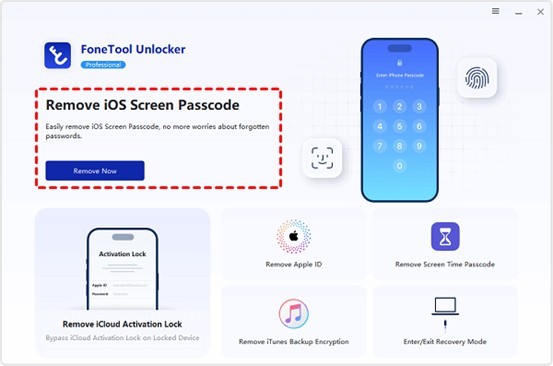
Step 2: This iPhone unlocker offers several options for removing passwords. In the main menu, select “Remove iOS Screen Password” and click the “Remove Now” button to proceed.
Step 3: Next, you need to put your iPhone into recovery mode. The software will display a brief animation. For most recent iPhones, simply quickly press the volume up button, then the volume down button, and then hold down the side button until a black screen appears with a connector icon pointing towards your laptop. Older models may use different combination of keys, but the animated guide will clearly indicate which buttons to press.
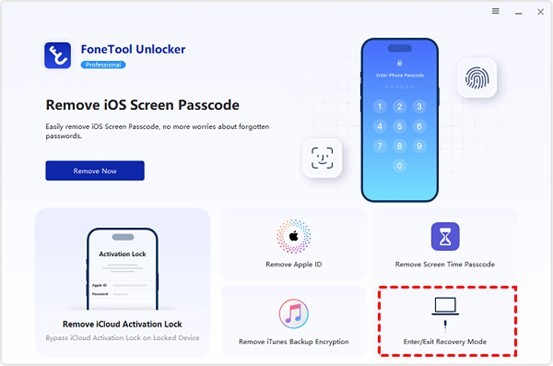
² An easier way is to select “Enter/Exit Recovery Mode” from the main menu.
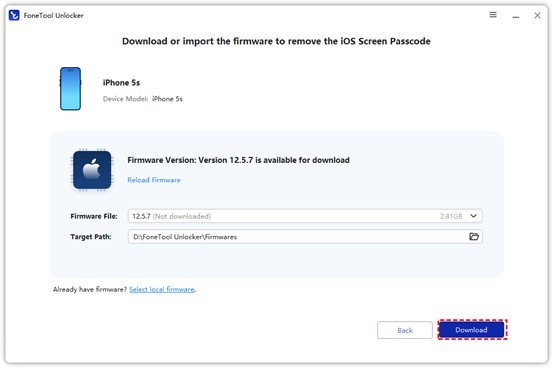
Step 4: Once your iPhone is in recovery mode, FoneTool Unlocker will automatically download the correct firmware for your device.
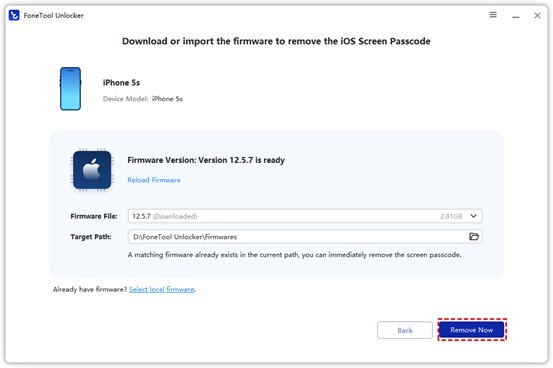
Step 5: Then click “Remove Now”. The software will remove the screen lock feature within approximately three minutes. Your iPhone will automatically restart. Once the Apple logo disappears, you will see the “Hello” setup screen. No password is required.
Summary
Forgetting your iPhone's passcode feels terrible, but it doesn't have to be a complete ruin for the day. FoneTool Unlocker provides you with a fast, easy, and reliable way to get your device back. The steps are clear and the interface is user-friendly, and you can finally get your phone back up and running. The next time your brain can't remember those six numbers, you can always find a simple solution on your desk.

What's your reaction?
You may also like
-

Why Small Roofing Problems Can Become Harder to Diagnose When Homeowners Delay Repairs
-
Planning a Stair Lift for Shared Homes Without Disrupting Everyday Staircase Use
-
Managing Household Waste During Large Decluttering Projects Without Creating New Clutter
-
How to Plan Impact Door Installation Around Security, Access, and Everyday Household Routines
-
How Commercial Roofing Maintenance Planning Helps Property Managers Track Roof Conditions
-
Designing Privacy Around Street-Facing Windows Without Giving Up Useful Natural Daylight











Comments
0 comment