




The best approach is to map the permanent layout first, define practical cleaning zones, and treat the gate as a movable obstacle. Cleaning convenience must never take priority over child safety. The following steps can help you create a reliable route without expecting the robot or its app to do more than it can.
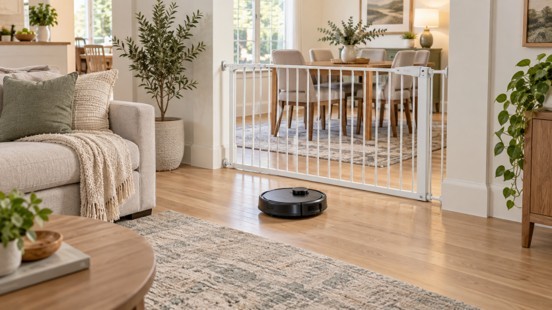
How Should You Map an Open Floor Plan with a Baby Gate?
Mapping is the backbone of consistent robot vacuum performance in dynamic open homes. Since baby gates constantly shift between open and closed states, you need a fixed, permanent base map paired with flexible virtual zoning. Below are the key questions to resolve for safe, accurate, and repeatable mapping results.
Should the Baby Gate Be Open or Closed During Initial Mapping?
Open or remove the gate only when doing so is safe, supervised, and consistent with its installation instructions. Otherwise, leave it secured and map the accessible areas separately.
The US Consumer Product Safety Commission says safety devices must be installed correctly and reengaged after use. At the top of stairs, the agency recommends using only gates that screw into the wall. A virtual boundary or robot sensor cannot replace this physical protection.
During a safe mapping run, open the doors to all rooms you want included, remove cords and toys, flatten rug edges, and avoid moving large pieces of furniture. Restore and check the baby gate as soon as the mapping session is complete.
How Can You Divide Living and Dining Areas Without Permanent Walls?
With a stable base map in place, divide the continuous floor into zones you can clean independently. In the app, place a virtual room boundary at a logical point—for example, between the seating area and the dining table—so the robot treats each side as its own room.
Choose boundaries that match your routine. If the baby gate often separates the living and dining areas, give each side its own room label so you can clean either side when the gate is closed.
Anchor the boundary to something visible. Stable lines tend to follow:
- A rug edge, or the line where hard flooring meets carpet
- The gap between a sofa and the dining table
- A doorway opening
Avoid drawing a boundary mid-room with no visual cue—it tends to cause awkward placements when you edit the map later.
Verify each zone before trusting the schedule. Run a supervised single-zone clean and check three things:
- The robot starts inside the right area
- It stays inside without crossing the boundary
- It returns to the station
If it wanders or the boundary sits wrong, adjust the virtual line and test again—most apps allow this without remapping.
How Can You Protect the Child-safe Boundary During Cleaning?
Protect the boundary by treating the baby gate as fixed safety equipment during unsupervised cleaning. Do not loosen, prop open, reposition, or replace a compliant child gate simply to give the robot access.
CPSC reports that recalls reviewed from 2008 through 2018 covered 1,318,180 gates associated with 215 incidents and 13 injuries. These are recall figures, not an estimate of all gate-related injuries, but they reinforce why safety must take priority over cleaning coverage.
How Do Thresholds and Mixed Flooring Affect the Route?
Thresholds and mixed flooring determine whether the robot can reach a zone and which cleaning behavior it should use after crossing into that area. Consider physical clearance and floor-care settings separately.
How Should You Measure and Test Each Threshold?
Step 1 — Measure the transition. Check the highest point of each threshold before adding it to an automatic route. Compare shapes, not just heights: an abrupt rail is harder to cross than a rounded transition of the same height. Also inspect for looseness—a loose transition strip or a curled rug edge can catch a wheel or brush.
Step 2 — Test from both directions under supervision. Run the robot across each threshold in both directions and watch for these failure signs:
- Wheel spin (the robot revs in place)
- Repeated impacts against the edge
- Scraping sounds
- Brushes getting trapped
Step 3 — Judge the result. Pass means it crosses smoothly in both directions. Fail means any sign above appears, or the robot needs a second attempt. Note that a baby gate's bottom rail is not an ordinary flooring threshold: a rated clearance figure does not guarantee that every rail shape is safe or passable.
Step 4 — Apply the fallback. If the crossing is unreliable, treat the gate line as a zone boundary and clean the two sides separately.
Which Settings Work Across Hard Floors, Rugs, and Carpet?
Use surface-specific settings as the robot moves between hard flooring and carpet. Keep mopping limited to compatible sealed hard floors, and follow the flooring manufacturer’s care instructions.
Secure lightweight rugs and flatten curled corners before cleaning. If a rug repeatedly causes navigation problems, mark it as a no-go zone instead of relying on the robot to detect and avoid it correctly every time.
How Do You Keep Routes Reliable as Gate Positions Change?
Unlike fixed walls, baby gates create daily layout changes that can render saved cleaning zones unreachable. Many route errors happen not because the map is wrong, but because temporary obstacles conflict with pre-planned paths. You need clear rules for when to test, adjust, or reset your home map.
When Should You Edit, Test, or Rebuild the Map?
Edit the map when room labels or virtual boundaries need refinement, test it after moving a gate or rug, and rebuild it only when the stored layout remains inaccurate. Remapping the home will not fix a temporary obstruction.
Validate one zone at a time. Confirm that the robot can enter and cover the zone, leave it, and return to its station without touching the gate. Keep the sensors clean and the firmware current. If the same location repeatedly causes detours or failed runs, simplify the boundary or exclude the problem area.
Small environmental changes do not always require a new map. A chair moved during dinner or a gate closed for an afternoon is a temporary condition. A structural renovation, permanently relocated station, or major furniture rearrangement is more likely to justify editing or rebuilding the map.
What Should You Do When a Cleaning Zone Becomes Unreachable?
Skip or reschedule an unreachable zone instead of forcing the robot past the gate. Clean the accessible side first and run the other side when it can be reached safely. If this happens regularly, save a separate routine for each side.
Check the gate’s position, the route to the station, and the app boundary before troubleshooting the map. Also look for a shifted rug, dining chair, toy, or cable that may have narrowed the path. Preserve the existing map when the obstruction is temporary. Edit or rebuild it only after a permanent layout change.
This is usually more reliable than starting a whole-home cleaning cycle and expecting the robot to resolve a route that may or may not be open.
What Should You Check Before Choosing the Best Mapping Robot Vacuum?
This type of home calls for more than a high suction figure. The best mapping robot vacuum for the job should handle five situations well—each has a specific thing to check, and a specific failure mode when it falls short:
| Function | What to check | What goes wrong if it falls short |
| Editable room boundaries | Whether you can draw and adjust virtual lines, and rename rooms in the app | You cannot split a connected living-dining area, so one side stays unreachable when the gate is closed |
| Targeted zone cleaning | Whether you can select one room or area and schedule it on its own | Every run becomes a whole-home cycle, and a blocked gate ruins the entire pass |
| Reliable obstacle avoidance | The sensing type (laser, vision, or 3D modeling) and the smallest object it can detect | The robot keeps hitting toys and cables, or gets stuck under furniture |
| Threshold clearance | The rated clearance (for example, 1.65 in / 4.2 cm) and whether double thresholds are supported | It wedges on a threshold or the gate's bottom rail and aborts mid-run |
| Carpet and hard-floor modes | Whether suction adjusts and the mop lifts automatically on carpet | Carpets get wet, hard floors get smeared, or suction is wrong for the surface |
How Does the eufy Robot Vacuum Omni S2 Match Those Needs?
The eufy Robot Vacuum Omni S2 maps the home in 3D and lets users edit the map, split or merge rooms, use zoned cleaning, and set no-go zones in the app—so each side of a gated open-plan area can be cleaned separately. Around obstacles, 3D MatrixEye™ 2.0 uses real-time 3D modeling to detect obstacles over 1 cm and recognize 200+ types, while the chassis can cross double thresholds up to 1.65 in (4.2 cm).
On mixed floors, it automatically lifts the mop on short- and medium-pile carpets when Vacuum-Only mode is enabled, helping prevent them from getting wet. For tasseled or thick carpets over 5 cm, use Carpet Avoidance mode so the robot automatically skips those areas. Its HydroJet™ 2.0 self-cleaning roller mop handles hard-floor mopping, so confirm that the flooring is suitable before setting mopping zones.
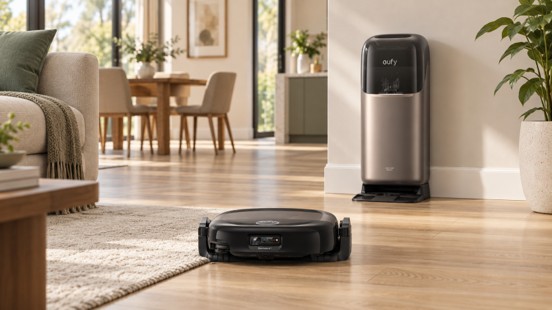
The best route plan uses a stable map of the permanent layout, logical living and dining zones, surface-appropriate settings, and schedules that match the baby gate’s safe position. Map the widest safe area under supervision, measure each transition, and test routes near the gate from both directions.
The eufy Robot Vacuum Omni S2 offers relevant mapping tools, no-go zones, obstacle avoidance, threshold clearance, and mixed-floor cleaning. None of these functions should be treated as a child-safety feature or a guarantee that a gate rail is passable. Let the baby gate define the safety boundary, and adapt the cleaning plan around it.

What's your reaction?
You may also like
-

How to Find the Right Identity Security Software for Your Organization
-
How Professional Financial Advisement Creates Better Outcomes
-
4 Ways to Simplify Property Cleanouts
-
7 Strategies for Strengthening Device Security
-
8 Nutrient-Packed Ingredients That Can Elevate Your Morning Smoothie
-
7 Reasons Racing Simulators Are Becoming the Ultimate Motorsports Experience










Comments
0 comment