




A photo of a kite above the beach already has a subject, a setting, and a feeling. Seedance 2.5 can build on that starting image with a single 30-second generation, leaving room for an opening, a small action, and a final frame. That extra time is useful when the goal is to make a short visual story from a moment someone already saved.
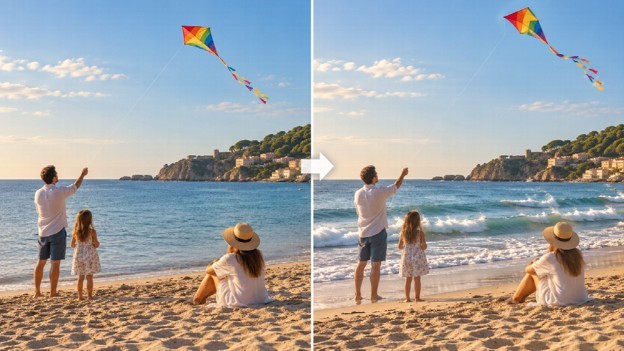
Editorial illustration of a photo-to-video concept.
Think of the clip in three parts: show the beach and kite, let the kite drift as the waves move, then settle the camera on the sunset. Put the source image and that direction into the Seedance 2.5 AI video generator, and describe what should stay recognizable as clearly as what should move.
Start with what is already in the frame
Start with the image itself. Where does the eye land first? Which details tell viewers where they are, and which small motion could add life without changing the memory? A beach image might already have a kite, a shoreline, and one person standing near the water. The kite can drift, the waves can roll in, and the person can remain still. If everything moves at once, the original subject is harder to recognize.
This first decision matters more than stacking adjectives. “Dreamy,” “cinematic,” or “viral” does not say what the kite should do or where the camera should look. A useful prompt names the subject, action, movement, and final view. It also says which important details should remain consistent, such as the people, clothing, or shape of the coastline.
A half-minute can hold a beginning and an ending
Seedance 2.5 supports a single 30-second generation. Use the opening to establish the beach, the middle for one action, and the ending for a final view or a short message. This does not require three unrelated scenes; one camera move can connect the parts. For example, the shot can begin wide, follow the kite as it shifts in the wind, and finish with the sunset at the horizon.
A prompt might say:
Use the uploaded beach photo as the main visual reference. Keep the kite, shoreline, clothing, and colors consistent. In the opening, show the full beach; then let the kite move gently as small waves reach the shore; finish with a slow camera move toward the sunset. Add the caption “One last afternoon by the sea” at the bottom, spelled exactly as written.
The prompt sets the sequence and includes the caption in the generated scene. Add a date, place, or name the same way when the video is an invitation or announcement. Review the generated words before sharing, especially when viewers rely on an exact date or address. If the caption is difficult to read, shorten it and give it a simpler placement in the prompt.
When one photo is not enough
One source photo is enough for a simple clip, but Seedance 2.5 also supports a multimodal reference stack: up to 30 images, 10 videos, and 10 audio files. That can help when the creator has a specific visual style or movement in mind. A second image might guide the color palette, a short wave video can show the timing of the water, and an audio file can suggest whether the scene should feel quiet or lively. The Seedance 3 AI video generator homepage is another place to explore image-to-video workflows.
Each reference should answer a different question. The original photo anchors the setting. A motion reference demonstrates camera movement or how an object moves. An audio reference points to sound. If several images show different beaches, outfits, or times of day, the model has to reconcile conflicting directions. Choose only materials that support the same scene and explain their role in the prompt. The Seedance AI video generator homepage is another starting point for exploring short-form video creation.
For a creator making a series of short clips, keep a small reference set for recurring details. The same person, jacket, or location can appear in several posts. Reuse approved images for appearance and setting, then change the action or framing for each new clip. That gives the series a recognizable look while allowing each photo to lead to a different moment.
Keep the scene recognizable
Photo-to-video works best when the movement fits the image. A kite can shift in the wind because it is already airborne. A candle flame can flicker because the wick is visible. A person standing by a train may wave or watch the train move, but adding a second crowd or a sudden change of location creates a different story.
Describe the limits that matter: keep faces recognizable, preserve clothing colors, retain the shoreline and horizon, and move only the chosen subject. Then compare the output with the source image. If the person’s face or the important object changes, simplify the direction and keep the movement smaller. This is a practical review step, not a reason to rewrite every part of the prompt.
Sound can extend the same idea. Gentle surf may fit a beach image; a busy music track may pull attention away from a quiet scene. If an audio reference is available, choose one that supports the pace of the motion. The clip should still make sense with the sound off, since many people watch social posts without audio.
A 4K file still needs a good crop
Seedance 2.5 offers 4K output, which can suit a launch-page video, a large display, or a social post that needs finer detail. The original photo still shapes what viewers can recognize, so inspect faces and small objects against the source. A high-resolution export does not make a distant subject more legible if the starting composition gives it very little space.
Aspect ratio matters just as much for a phone post. A vertical crop can remove the kite, a person near the edge, or the band of sunset that gives the photo its mood. Check the full frame after resizing and move the subject toward the center in the prompt when the crop requires it. If one crop cannot preserve both the person and the kite, make a separate version instead of forcing one frame to serve every channel.
Check the clip against the original
It is easy to keep adding camera sweeps, light effects, falling petals, captions, and music. The question is whether those additions help viewers notice the photo’s main subject. For the kite image, one gentle motion and a clear ending may be enough. A birthday photo might need a candle flicker and the date; a street portrait might work with a small camera push and one short line of text.
Before publishing, check three things: does the clip still look like the chosen photo, does the movement read on a phone screen, and can viewers read the generated caption? Keep the original image nearby for comparison. If the answer is yes, the photo has become a short video without losing the reason it mattered in the first place.

What's your reaction?
You may also like
-

Root Canal Treatment: Signs You May Need It and What to Expect
-
How Often Should You Get a Roof Inspection? A Complete Homeowner's Guide
-
How Outdated Software Creates Hidden Cybersecurity Risks
-
The Role of Steel Fabrication in Modern Construction and Infrastructure
-
7 Beginner Mistakes to Avoid When Exploring Off-Road Terrain
-
7 Style Rules Every Parent Should Know Before Dressing Kids for Formal Events










Comments
0 comment