




I have spent too many afternoons digging through free AI image tools only to feel more tired than inspired. A handful of sites practically buried the generation panel under display ads, and others interrupted the workflow with full‑screen pop‑ups urging me to subscribe before I had even seen one decent output. After a few frustrating days, I narrowed my search to platforms that promise a more focused creative space, and that is when I started testing AI Image Maker alongside several other well‑known generators. What I wanted was not the absolute highest‑resolution single image on the internet; I wanted a place that would let me iterate quickly, keep distractions out of sight, and produce visuals I could actually trust at a glance.
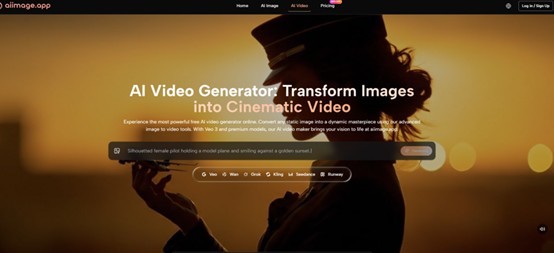
The low‑quality AI image landscape is dense with tools that appear promising on a search results page but fall apart the moment you start clicking. Some default to horrendous load times because the page is serving third‑party scripts and video ads before the model inference even begins. Others cough out watermarked previews that are barely usable for a quick mood board, let alone for a client presentation. The worst offenders mix AI generation with cluttered feature sets borrowed from outdated design editors, so the interface feels like a patchwork of unfinished modules. My aim was to understand which platforms feel built for people who need to generate a lot of visual material and need to stay in a calm, productive headspace while doing it.
To keep the test fair, I created a set of ten prompts covering realistic portraits, product‑style still life, line art for a comic idea, a flat‑lay texture concept, and a futuristic cityscape. I ran each prompt on five tools: AIImage.app, Midjourney, Canva’s integrated AI image tool, the Freepik image generator, and Leonardo AI. I timed the first visible result, counted any ad or upsell interrupt that blocked the screen, noted how often I had to close a modal to see my image, and then scored the output purely on how stable it looked under a quick quality check and a more detailed inspection. The test was spread over four different weekdays to account for server‑side variance and my own fluctuating patience.
After the first round, I noticed something that shifted where I placed my attention. The GPT Image 2 model inside AIImage.app kept delivering images that demanded less re‑prompting when I wanted realistic textures and clean object outlines. Where some generators gave me a breathtaking composition but mangled the number of windows on a building or the symmetry of a pair of earrings, this one seemed to care about structural accuracy without me having to beg for it in all caps. That mattered because I was measuring more than just “does it look beautiful.” I was measuring whether the result felt usable the first time, and whether the page around it helped or hurt that judgment.
Before unpacking the scoring, I need to describe the mental weight that comes from using an ad‑heavy or button‑chaotic site. When a page forces me to close a newsletter modal, dismiss a cookie banner, scroll past a hero video, and then still fight for screen real estate to locate the prompt field, my ability to assess image quality drops. I start rushing. I accept mediocre outputs just to get out of the tab. All of a sudden the tool is not an image generator; it is a conversion funnel pretending to be a creative canvas. That feeling became a baseline filter, and it eliminated a couple of platforms almost immediately from my daily workflow.
The table below captures where things landed after several days of repeated testing. Scores are based on an honest 10‑point scale where 7.5 is workable and 9.0 reflects an experience that rarely gets in the way. I did not award perfection to any single dimension because even the cleanest tool occasionally shows a quirk.
Midjourney still leads in raw image quality, and I would not take that away from it. The textures it produces under the right prompt can feel almost tactile. However, the Discord‑based interface introduces friction when I need to quickly organize batches, compare variations side by side, or work in a quiet visual mood without chat noise around me. It feels like using a command line for something I want to do with my eyes and my muscle memory. Leonardo AI impressed me with its clean dashboard and generous free tier, and I would recommend it to people who want strong control without constant upsells. Canva’s AI image tool fits smoothly into its design ecosystem, but the persistent upgrade prompts and the slightly generic rendering on detailed scenes lowered its score. Freepik’s tool can produce charming work, especially with stylized flourishes, yet the interface felt heavy and the watermark reminders slowed down evaluation.
What kept AIImage.app at the top of the overall column was not a single standout feature but the way everything stayed out of the way. The pages loaded fast enough that I never thought about the loading icon. I did not have to close a promotional modal once during my entire test week. The image previews rendered without first showing me a blurry thumbnail that sharpened over five seconds, and the download button was exactly where I expected it to be every time. That might sound uneventful, but when you are testing five tools back to back, uneventful feels like a privilege.
How the Platform Keeps a Clean Rhythm
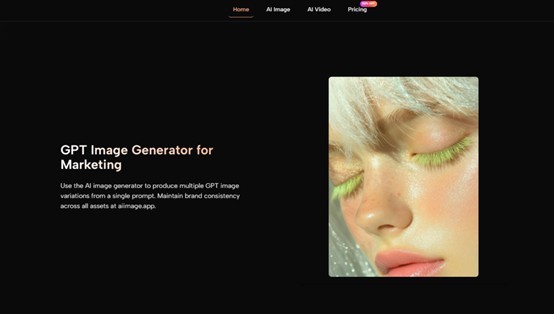
A Prompt Flow That Matches Real‑World Speed
A smooth experience is not just about the moment of clicking Generate. It begins the second I land on the site and decide whether my idea will survive the interface. Here, the interaction feels deliberately simple. The page avoids competing with itself. I saw no auto‑playing videos, no banner carousels, and no layout that required horizontal scrolling on a laptop screen. That matters more than it might seem because the moment I have to hunt for the input field, my brain begins to treat the tool as a puzzle instead of a paintbrush, and the creative quality degrades.
The Test Workflow, Repeated Across Platforms
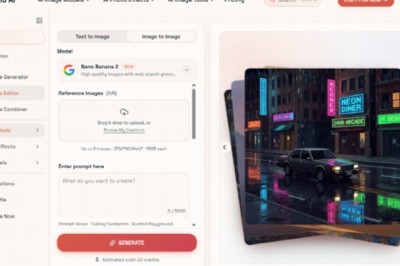
To keep my observations grounded, I followed the same core workflow on every tool I tested. The steps I used on AIImage.app mirrored the official flow the site presents, and I applied the same logic everywhere.
- Pick a creation path – an image generation mode, an editing flow that uses a reference upload, or a video‑oriented option when available.
- Enter a prompt or upload a reference image depending on whether I was starting from scratch or reworking an earlier generated piece.
- Select an available AI image or video model that seemed appropriate for the subject and style.
- Generate, review, compare a few variations, download the usable ones, and continue refining the ones that were almost right.
Those four moves were consistent whether I was on AIImage.app or a competitor, and the friction I recorded usually happened between step three and step four. If the model switcher was buried, or if the generation queue displayed confusing status messages, I clocked it as a speed or clarity loss. On AIImage.app the model selector sat visibly near the prompt area, and switching between different generation models felt like flipping a mode switch rather than opening a sub‑system. That small design choice saved time and kept my flow intact across dozens of prompts.
Ad Distraction and the Trust Equation
I want to unpack ad distraction separately because it is the dimension most blog posts skip. A watermark is a visual note that says “you do not fully own this yet.” A pop‑up is a behavioral interrupt that says “our business goal matters more than your current task.” On Freepik, I encountered multiple nudges to upgrade when I tried to download a high‑resolution version. On Canva, a full‑screen prompt reminded me about a trial expiration while I was trying to evaluate a subtle lighting detail. These experiences chip away at something fragile: the feeling that the tool respects your attention.
AIImage.app took a noticeably restrained approach. I saw a clean generation page with clearly marked plan information placed outside the core creative zone. The output came without a watermark in every mode I tried, which meant I could do a quick quality check, slip the image into a layout draft, and decide on its worth purely by how it looked. That may sound like a small win, but across twenty or thirty images it becomes a major trust signal. The site does not treat the output as something it needs to reclaim; it treats output as something the user is meant to use.
Real‑World Visual Trust and Usable Detail
When Accuracy Matters More Than Artistic Flair
One prompt in my test was a titanium water bottle on a light wooden desk with morning light from a side window. Several platforms gave me a stunning lighting atmosphere but mangled the bottle cap or added an unexplained double shadow that made the image useless for e‑commerce mock‑ups. The model I used inside AIImage.app preserved the bottle’s proportions and kept the branding‑blank surface clean enough to drop in a label replacement later. It did not produce the most dramatic light ray I have ever seen, and it did not try to. It produced an image that felt solid enough to share with a client on the second round, not the twenty‑second. That balance, between artistry and reliability, is where this platform earned its quality rating.
Where the Tool Shows Its Limits
No tool handles every style with equal strength. When I pushed extremely abstract prompts — dreamlike shapes with no clear subject, or surreal color fields that go beyond photoreal logic — the results could feel over‑structured, as if the system wanted to anchor itself in a recognizable object. Sometimes that anchor was useful; other times it pulled the image away from the pure texture study I wanted. The video‑oriented features, while present, felt more like a useful starting point than a production‑grade timeline replacement, and I would recommend treating them as sketch tools for motion ideas rather than final render pipelines. Free‑tier users will also need to pay attention to credit limits, but that is standard across the category and not a unique friction point.
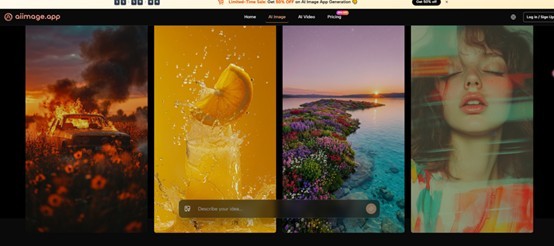
Who Should Spend Time Here
If you are someone who needs to generate multiple images per session, values a clean workspace, and wants to spend brainpower on the prompt rather than on fighting interface clutter, this is a sensible default. It suits marketing generalists who need product visuals without a design background, educators building quick concept illustrations, and content creators who iterate social media assets several times a week. It is less suited to an artist who needs the absolute most painterly, unpredictable output as their staple style; those users may still want Midjourney as a primary canvas while keeping AIImage.app in the toolbox for moments when speed and cleanliness must come first.
Over a month of intermittent but repetitive testing, what I appreciated most was not a single generated image that blew me away but the fact that I never felt like leaving the tab. The site stayed quiet, fast, and visually modest enough that my own ideas remained the loudest thing on the screen. For a category where everyday usage matters more than a one‑off masterpiece, that kind of restraint is worth more than any flashy demo.

What's your reaction?
You may also like
-

Why Small Roofing Problems Can Become Harder to Diagnose When Homeowners Delay Repairs
-
Planning a Stair Lift for Shared Homes Without Disrupting Everyday Staircase Use
-
Managing Household Waste During Large Decluttering Projects Without Creating New Clutter
-
How to Plan Impact Door Installation Around Security, Access, and Everyday Household Routines
-
How Commercial Roofing Maintenance Planning Helps Property Managers Track Roof Conditions
-
Designing Privacy Around Street-Facing Windows Without Giving Up Useful Natural Daylight













Comments
0 comment