




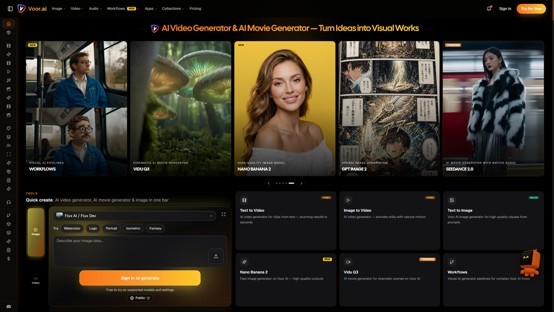
Flux Dev is a 12B-parameter text-to-image model that creates high-quality images, follows prompts well, and renders clear text—no local install required. On Voor AI, you can run the FLUX Dev AI Image Generator online in the browser: enter a detailed prompt, pick an aspect ratio, and get high-fidelity portraits, product shots, concept art, and poster mockups in seconds.
What Is FLUX Dev?
FLUX.1 Dev (often searched as FLUX Dev or Flux 1 Dev) is the open-weight, guidance-distilled variant in the FLUX family from Black Forest Labs. It sits between FLUX Schnell (fast, Apache 2.0) and FLUX Pro (closed API, highest tier): production-grade quality with public weights you can inspect, fine-tune, or reproduce.
Unlike older SDXL-class models that lose focus on long prompts, FLUX Dev follows multi-clause descriptions of subject, environment, lighting, and lens behavior reliably. Its default register is photographic realism — skin texture, fabric, depth of field — but it also handles stylized instructions when you name the medium explicitly.
Core capabilities
| Capability | What it means in practice |
| Text-to-image | Generate from detailed natural-language prompts |
| Photographic realism | Portraits, products, and scenes with micro-detail |
| Typography | Short on-image text — labels, signs, packaging — stays legible |
| Long prompt adherence | 100+ word prompts without losing subject or style |
| Guidance distilled | Near-Pro quality at lower inference cost than raw Pro |
| Flexible aspect ratios | 1:1, 16:9, 9:16, 3:2, 4:5, and more on Voor AI |
| Browser-ready | No GPU, no diffusers install, no checkpoint download |
What Voor AI Offers
Voor AI is a web-based creative platform that hosts dozens of AI models for images, video, and sound in one place. Instead of paying for multiple APIs or managing a local GPU stack, creators can simply write a prompt, pick a tool, and get results in minutes.
The platform is built for end-to-end production, not single-model demos. You might draft a product shot with FLUX Dev, refine it with an image editor, turn the still into motion, and add a soundtrack — all under the same login. That makes Voor AI a practical home base for marketers testing ad visuals, indie teams building game art, and solo creators who want professional output without learning node-based workflows.
How to use FLUX Dev AI Image Generator
- Go to voor.ai and sign up for free — eligible new accounts get free generations; standard runs use ~6 credits afterward
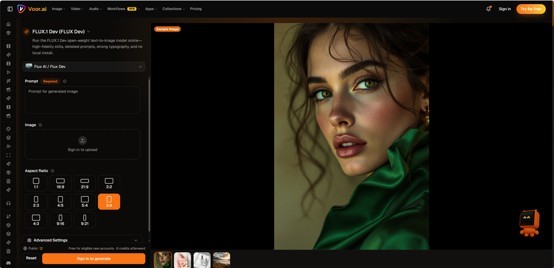
- Open FLUX Dev — FLUX Dev is pre-selected on this page
- Write a layered prompt — lead with subject and medium, then add lighting, lens, and mood
- Choose an aspect ratio — 1:1 for social, 16:9 for banners, 9:16 for story reels
- Click Generate — compare two seeds if needed, then refine the prompt and rerun
- Download your image or chain it into image-to-video or other Voor AI tools
FLUX Dev prompt tips
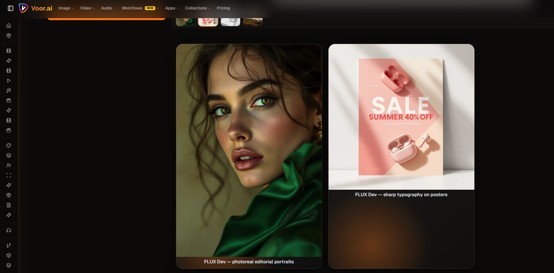
- Lead with the subject — FLUX Dev weights the first ~20 words most heavily
- Name the medium early — "a 35mm portrait photograph of…" or "an editorial illustration of…"
- Add lighting and lens cues — "golden hour", "85mm portrait lens", "softbox studio light"
- Keep on-image text short — a few words on labels or signs work; long paragraphs still degrade
- Generate twice with the same prompt — pick the better seed before tweaking words
Example prompt: A 35mm editorial photograph of a matte black skincare bottle on white marble, soft side light, shallow depth of field, premium ecommerce packshot. Small label text reads "Hydrate". Clean minimal background.
When to Choose FLUX Dev
- Photoreal product and portrait work — hero shots, lookbooks, and lifestyle scenes
- Concept art and illustration — one model for realism and stylized briefs
- Long, detailed prompts — multi-clause briefs land more reliably than on SDXL-class models
- Poster and packaging mockups — short typography and layout cues in one pass
Conclusion
If you want open-weight quality without self-hosting a 12B checkpoint, FLUX Dev is the practical default in the FLUX family. On Voor AI, the FLUX Dev runs alongside video, image, and audio tools in one studio — start at flux dev, write one detailed prompt, and see how quickly a brief becomes a finished visual.

What's your reaction?
You may also like
-

10 Proven Strategies Accelerated Growth Advisors Recommend for Every MCA Firm
-
How Imaging Services Help Diagnose Medical Conditions
-
How to Plan Stress-Free Airport Transportation for Families With Young Children
-
Smart Business Growth: How to Scale Customer Support Without Increasing Overhead
-
Essentials Hoodie for Everyday Layering: Stylish Outfit Ideas for Every Season
-
Cloudways BFCM 2026: 80% OFF for 2 Months + Unlimited Migrations









Comments
0 comment