




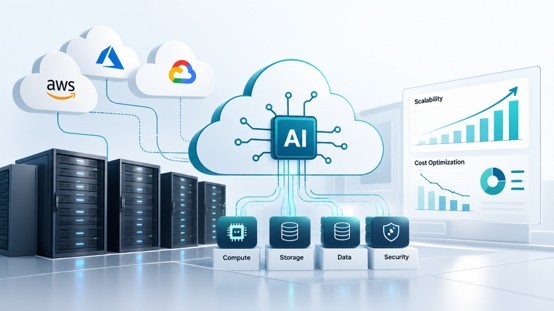
AI applications are changing how businesses use cloud environments, but running AI workloads requires more than simply deploying an application on a virtual server. Model inference, GPU-intensive workloads, large datasets, real-time processing, and AI-powered applications can place very different demands on compute, storage, networking, and security. This makes cloud infrastructure for AI an important consideration for businesses moving AI projects from development to production.
A well-designed AI infrastructure needs to balance performance, scalability, reliability, and cost. It should also adapt as workloads change without creating unnecessary infrastructure spending. Businesses can use cloud infrastructure management services to design and manage environments that support these requirements while keeping AI workloads secure, scalable, and operationally efficient. This article explores the key architecture decisions, scaling strategies, and cost considerations involved in building AI-ready cloud infrastructure.
What is Cloud Infrastructure for AI?
Cloud infrastructure for AI is the combination of computing, storage, networking, data services, and software resources required to develop, deploy, and operate artificial intelligence applications in the cloud. Unlike conventional applications, AI workloads can require significant computing power, large datasets, specialized hardware, and continuous data processing.
A typical AI cloud infrastructure can include:
Compute resources: CPUs, GPUs, and other accelerators for model training and inference.
Data and storage: Object storage, databases, and data pipelines for managing training data, model files, and application data.
Networking: High-performance connections between compute, storage, databases, and AI services.
AI and application services: Machine learning platforms, model-serving environments, APIs, RAG pipelines, and vector databases.
Deployment and management: Containers, orchestration, monitoring, security, and CI/CD tools.
The infrastructure needs to support the entire AI lifecycle, from data preparation and model development to deployment and inference. This is why cloud infrastructure for artificial intelligence must be designed around workload requirements rather than simply extending a conventional application environment.
Key Architecture Components for AI Workloads
Building cloud architecture for generative AI requires infrastructure that can handle demanding compute requirements while keeping data and application services connected efficiently. The architecture should be modular enough to support different AI workloads and adapt as models and usage patterns change.
1) Compute
AI workloads may require CPUs for general application processing and GPUs or other accelerators for model training and inference. The right compute configuration depends on the model, workload size, latency requirements, and expected usage.
2) Data and Storage
AI applications often work with large volumes of structured and unstructured data. Object storage, databases, vector databases, and data pipelines help manage datasets, model artifacts, embeddings, and application data while keeping information accessible to the services that need it.
3) Networking
Low-latency and reliable networking is important when AI applications connect compute resources with databases, storage, APIs, and external services. Network design should also account for data transfer volumes and security requirements.
4) Application and AI Services
The infrastructure layer needs to support model-serving APIs, RAG pipelines, vector search, application backends, and other AI services. Separating these components allows teams to update or scale individual services without disrupting the entire application.
5) Containers and Orchestration
Containers provide consistent environments for deploying AI workloads across development and production. Orchestration platforms can further automate deployment, resource allocation, scaling, and service management as workloads become more complex.
A modular architecture helps businesses build AI infrastructure for cloud environments that can evolve as application requirements, models, and workloads change.
Designing AI Infrastructure for Scale
AI workloads can change significantly depending on user demand, model complexity, data volume, and application usage. Infrastructure that works during development may become inefficient when an AI application moves into production. Designing for scale from the beginning helps maintain performance without continuously overprovisioning resources.
1) Use Flexible Compute Resources
AI workloads do not always require the same level of compute capacity. Cloud environments allow businesses to scale CPU and GPU resources based on workload requirements instead of maintaining fixed capacity at all times.
2) Separate Application and AI Workloads
Keeping application services, model inference, data processing, and other workloads in separate components makes them easier to scale independently. A sudden increase in AI inference requests, for example, should not require scaling the entire application stack.
3) Implement Auto-Scaling
Auto-scaling can dynamically add or remove resources based on metrics such as traffic, CPU or GPU utilization, queue length, and inference demand. This helps maintain application performance during demand spikes while reducing unused capacity during quieter periods.
4) Use Containers and Orchestration
Containerized deployments make AI services easier to replicate across environments. Orchestration platforms can manage workloads across multiple compute resources and support automated deployment, scaling, and recovery.
5) Monitor Performance and Capacity
Scaling decisions should be based on actual infrastructure data. Monitoring compute utilization, latency, throughput, memory consumption, and model performance helps teams identify bottlenecks before they affect users.
For businesses running complex AI workloads, end-to-end cloud engineering services can help connect architecture, deployment, scaling, monitoring, and infrastructure management into a cohesive production environment.
Controlling AI Cloud Infrastructure Costs
AI workloads can generate significant cloud expenses, particularly when applications depend on GPUs, high-performance compute, large datasets, or continuous model inference. Cost management should therefore be considered during infrastructure design rather than after deployment.
1) Right-Size Compute Resources
Using the largest available instance does not necessarily deliver the best economics. Teams should select CPU and GPU resources based on actual workload requirements, model performance, latency targets, and usage patterns.
2) Scale Resources With Demand
AI applications may experience periods of high and low demand. Auto-scaling and workload scheduling can reduce the amount of compute running when capacity is not required. For suitable workloads, batch processing can also help avoid keeping expensive resources active continuously.
3) Optimize Storage and Data Transfer
Large datasets, model artifacts, logs, and generated outputs can increase storage and network costs over time. Applying appropriate storage tiers, retention policies, compression, and data-transfer strategies can help control these expenses.
4) Monitor Infrastructure Spending
Cost monitoring should connect infrastructure usage with individual workloads and services. Tracking compute utilization, storage consumption, data transfer, and resource trends helps teams identify unused or inefficient resources.
Businesses with complex AI workloads can also work with a cloud cost optimization company to identify infrastructure waste and develop more efficient resource-management strategies.
Cost optimization should not mean reducing resources indiscriminately. The goal is to maintain the required performance and reliability while ensuring that cloud resources are used efficiently.
Choosing the Right Cloud Approach for AI
The right cloud environment depends on the type of AI workload, existing technology stack, data requirements, and budget. AWS, Microsoft Azure, and Google Cloud can all support AI applications, but their ecosystems may align differently with specific workloads.
- AWS: A broad fit for organizations running diverse AI workloads across scalable compute, storage, databases, and custom machine learning infrastructure. Its extensive cloud ecosystem can be useful when AI applications need to integrate with existing AWS-based systems.
- Microsoft Azure: A strong fit for enterprises already using Microsoft technologies and services. AI workloads that need integration with Microsoft business applications, enterprise identity, and Azure's AI and machine learning services can benefit from this ecosystem.
- Google Cloud: Particularly relevant for data-intensive AI and machine learning workloads. Its data analytics, machine learning, and AI services can be useful for applications involving large-scale data processing, model development, and advanced analytics.
When evaluating providers, businesses should also consider GPU and accelerator availability, scalability, regional coverage, security and compliance, integration requirements, and total infrastructure costs. The objective is not simply to choose a cloud with strong AI capabilities, but to select an environment that fits the workload and existing technology landscape.
Building AI Applications on Cloud Infrastructure
Cloud infrastructure provides the foundation, but production AI applications also need reliable application services, data pipelines, model deployment, and operational controls. These components need to work together so an AI application can move from experimentation to consistent production use.
1) Connect Models With Application Services
AI models typically operate as part of a larger application rather than in isolation. APIs can connect models with web applications, mobile apps, business systems, databases, and external services.
2) Support RAG and Data-Driven AI
Applications that use retrieval-augmented generation (RAG) need infrastructure for document processing, embeddings, vector databases, retrieval, and model inference. These components should be designed to handle both data growth and increasing user requests.
3) Automate Deployment and Monitoring
CI/CD pipelines can automate application and model deployments, while monitoring can track latency, resource utilization, errors, and application performance. This helps teams identify issues and maintain consistent production environments.
4) Build for Security
AI infrastructure should include appropriate identity and access controls, encryption, network security, data protection, and monitoring. Sensitive business data should only be accessible to authorized services and users.
Businesses developing production-ready AI applications can work with an AI/ML development company to integrate models with cloud infrastructure, enterprise systems, data sources, and application workflows.
The result is an AI environment designed not just to run a model, but to support the complete application lifecycle from development through production.
Final Takeaway
Building effective AI applications in the cloud requires more than access to powerful computing resources. Businesses need an architecture that supports AI workloads, infrastructure that can scale with demand, and cost controls that prevent unnecessary spending. By aligning compute, data, networking, deployment, security, and monitoring with actual workload requirements, organizations can create cloud environments that support AI applications reliably from development through production.

What's your reaction?
You may also like
-

How Car Accident Lawyers Help Injured Victims Recover Fair Compensation
-
How to Respond After Being Charged With Assault Family Violence
-
7 Steps San Angelo Injury Victims Should Take After an Accident
-
A Guide to Crafting Authentic and Professional AI Marketing Content
-
What Jordan Traffic Rules Should Rental Car Drivers Follow?
-
Move-Out Cleaning Becomes a Different Job Once the Furniture Is Gone
















Comments
0 comment