




A bakery has a new weekend pastry box, two owners willing to appear online, and no time to organise a shoot. A short promo sounds easy until the brief tries to carry the whole menu, hours, a discount and the origin story. Before footage or effects, decide what viewers should remember. This guide shows how to turn one offer into a short video, keep attention without burying the facts, and check the result before you publish.
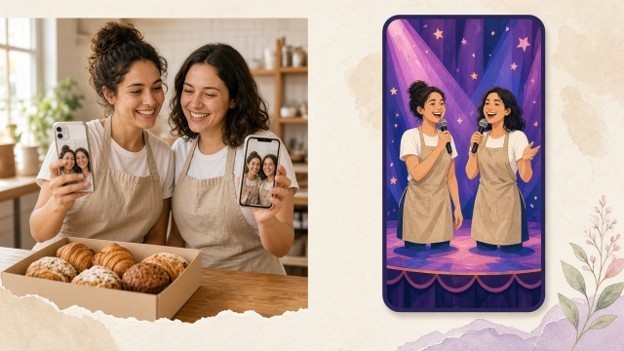
The difficulty is fitting personality and reliable information into the same clip. A slideshow shows products but may miss the people; filming a performance needs time you may not have. For a brief owner-led musical segment, an ai rap video generator can turn existing photos and a business topic into a short lip-synced performance. Treat that as one creative component, then build the factual message around it.
Start With One Customer Decision
Write a sentence describing the action the video should support: “Help nearby customers decide whether to reserve Saturday’s pastry box.” That is more useful than “promote the bakery” because it names a product, an audience and a decision. Cut details that do not help with that decision. The owners’ story might suit another post; the contents of the box belong in this one.
Create a small source sheet before drafting. Record the exact product name, current price, availability, collection arrangements and any conditions. Confirm these with whoever manages orders. If the price or collection window is still unsettled, keep it out of a finished video that could circulate after those details change. Temporary information belongs in a caption you can update.
Choose a question the video can answer visually. For the pastry box, customers might want to know what is included or how large the portions are. For a repair service, they might need to see which problems the business handles. A clip that answers a buying question has a reason to exist beyond repeating the company name.
Separate the Hook From the Evidence
Plan three functions: attract attention, demonstrate the offer, and explain the next step. These do not need three elaborate scenes. A short opening can introduce the owners, a close-up can show the actual box, and a final card can explain reservations. Sketch the sequence and allocate space to each function before making any generated footage.
Choose where a performance fits
A musical introduction can suit a cheerful food business or a playful seasonal promotion. It may distract when customers need a technical explanation, sensitive reassurance or detailed service conditions. Read the brief aloud in the intended tone. If the performance would make the offer harder to trust or understand, use a spoken introduction, ordinary photographs or a straightforward demonstration instead.
Keep generated performance separate from documentary evidence. A staged scene does not show how a pastry is made or what a customer will receive. Photograph the actual product in ordinary lighting, showing the quantity being sold. For a service, use footage you have permission to publish that demonstrates the real process. Never present invented customers or reactions as proof of quality.
Build a simple shot order
For a pastry-box promotion, open with a brief owner introduction, show the real contents, then finish with the collection instruction. Do not hide the product until the final frame. If the introduction occupies most of the edit, shorten it or start with the box instead. Each shot should either answer the customer’s question or make the next instruction easier to follow.
Prepare and Produce the Creative Segment
Get agreement from everyone appearing before uploading photographs. Explain that their likeness will be animated, what the promotion concerns and where you intend to publish it. Approval for a staff photograph is not approval of a synthetic performance. If someone is uncomfortable, choose a different creative approach.
When a photo-to-performance segment suits the brief, prepare one clear, front-facing photo of each consenting participant. On Hookai, pick a theme or stage and enter a short line naming the business, its product and one hook. Review the resulting performance and lyrics. If the offer is misstated, simplify the topic and regenerate; add product footage and accurate text separately in an editor.
Keep the input factual and narrow. An example brief: “Local bakery, Saturday pastry boxes, reserve for morning collection.” Avoid unverified superlatives, competitor comparisons and complicated conditions. If an exact detail must survive unchanged, place it in your own reviewed text rather than relying on a generated verse.
Review the Complete Video as a Customer
Assemble the performance, real footage and information card in a separate editing tool. Add essential text there; the generated performance does not supply on-screen prices or logos. Watch the assembled version on a phone at ordinary viewing size. Check that cropping preserves the product and people, and that the final instruction remains visible long enough to read.
Review with sound on, then muted. With sound, verify the spoken business name, product description and any offer mentioned in the lyrics. Muted, check whether viewers can still identify the offer and understand how to respond. Ask someone uninvolved in production to describe what is being sold. If they remember the performance but cannot explain the product, revise the sequence before publishing.
Publish Only What You Can Stand Behind
Use accuracy as the release standard: the offer matches current information, the footage supports it, and participants approve the final portrayal. Identify synthetic performance clearly rather than presenting it as filmed footage. Before paid distribution or a sponsored placement, confirm the relevant disclosure and platform requirements.
Keep the source sheet and final approved edit together. When the offer expires, stop reusing that version. Retain the planning method; replace the customer question, evidence and instruction. When you make a rap video AI clip for the hook, keep it short, keep the facts elsewhere in the edit, and let the offer—not the performance—be what customers remember.

What's your reaction?
You may also like
-

Top 5 Humidifier Brands for Home Offices and Productive Workspaces in 2026
-
8 Smart American Dream Auto Protection Tips for Drivers
-
7 Ways California Professional Growth Advisors Help Businesses Maximize R&D Tax Credits
-
9 Proven American Dream Auto Protection Savings Strategies
-
False Flags and Formal Writing: Why Original Text Sometimes Reads as Machine-Made
-
7 Essential Tips for Children’s Emergency Rooms Near Me














Comments
0 comment