




Getting a new iPhone is always exciting, but the process of moving data can quickly turn that excitement into frustration. Whether you're upgrading to the latest model or setting up a replacement device, you want your new iPhone to feel at home right away - all your photos, information, settings, and files are where you expect them to be.
Dilemma About Transferring Data to a New iPhone
Most iPhone users face the same basic challenge: how to transfer all important things from the old device to the new one without losing anything valuable.
Apple offers built-in solutions like iCloud and Quick Start, but the limitations of these solutions have frustrated many. iCloud's free 5GB storage is often not enough to complete backups, forcing users to either pay more space or make difficult choices about what to leave behind. For data-heavy users, wireless transfers can take hours, and the all-or-nothing approach with many built-in tools means you can't be selective about which files to transfer.
That's what third-party tools like FoneTool offer as a compelling alternative. By offering more powerful features, faster transfer speeds, and flexible iPhone backup options, they address pain points that users typically encounter when using traditional methods.
FoneTool - Smart Way to Transfer Everything to Your New iPhone
FoneTool is a comprehensive iOS data management tool dedicated to providing users with convenient and comprehensive iPhone data transfer services, transforming the data transfer process from tedious to a seamless experience. One of its particularly valuable aspects for new iPhone setups is its ability to keep the transferred content completely while ensuring that the transfer process proceeds quickly and reliably.
ü Selective transfer: Select only the data you actually want on your new device
ü No storage limits: Local transfers mean not relying on cloud storage limits
ü Significant speed: Direct device-to-device transfer via USB cable is significantly faster than wireless options and is not affected by the network
ü Quality preservation: All data transmissions maintain original quality
How to Use FoneTool for iPhone to iPhone Transfer
If you want to select only part of the data you need, the process of transferring old iPhone to new iPhone with FoneTool is straightforward:
Step 1. Download and install FoneTool on your Windows PC. Launch the software and connect your old iPhone using a USB cable.
Step 2. On the main interface, navigate to the "Phone Transfer" section and click on "iPhone to PC".
Step 3. You will see a clear list of data types categorized, and you can select the data you want to transfer to your iPhone, such as photos, music, contacts, and more.
Step 4. Set a secure destination path on your PC - this could be your internal drive, an external hard drive, or even a NAS for added security. Click "Start Transfer" to continue.
Step 5. Disconnect your old iPhone and connect your new iPhone to the same computer with a USB cable. Then go to "Phone Transfer" and select "PC to iPhone". Then drag the required data from the folder where the data is stored to the data frame. Tap “Start Transfer” to transfer data from one iPhone to another.
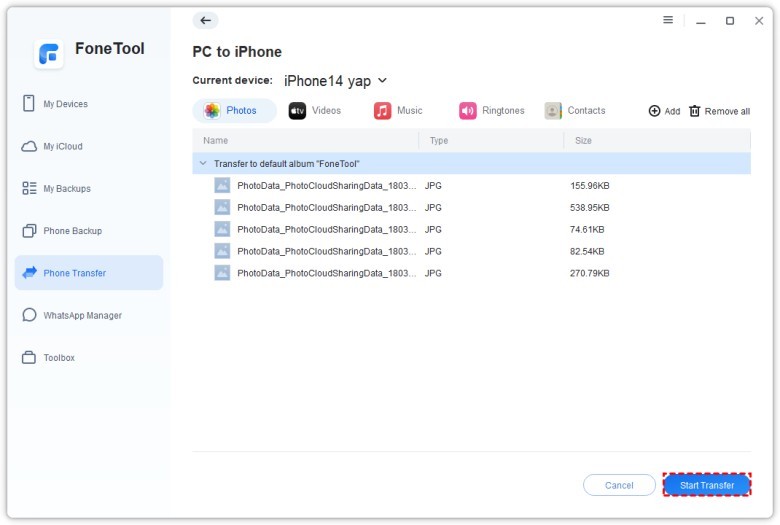
Tip: If you want to move the entire old iPhone data to the new iPhone directly, you can go to "Phone Transfer" > "iPhone to iPhone" in FoneTool to migrate iPhone data to new device in one click.
v FoneTool is ideal for users who wish to:
Select data during the upgrade process: Avoid bringing years of accumulated app caches, old downloads, and forgotten files.
Preview and confirm data before execution: Preview and select the album, message thread, or document that needs to be transferred.
Create an intermediate, secure backup: Have a local, encrypted copy of your important data on your computer or external drive before erasing your old device.
Overcome iCloud space limitations: Bypass the 5GB iCloud barrier entirely by using your computer's ample local storage.
Final Words
Transferring to a new iPhone should be a celebration of an upgrade, not a technical ordeal. While standard methods suffice for basic needs, they often fall short for users with substantial data or a desire for precise control. FoneTool elegantly fills this gap. By offering a fast, cable-stable, and meticulously selective transfer process, it removes the stress and uncertainty from data migration. It empowers you to strategically populate your new iPhone with exactly what matters most, ensuring your digital life transitions not just completely, but intelligently. With FoneTool, you can focus on the excitement of exploring your new device, confident that everything important has made the journey exactly as you intended.

What's your reaction?
You may also like
-

Why Small Roofing Problems Can Become Harder to Diagnose When Homeowners Delay Repairs
-
Planning a Stair Lift for Shared Homes Without Disrupting Everyday Staircase Use
-
Managing Household Waste During Large Decluttering Projects Without Creating New Clutter
-
How to Plan Impact Door Installation Around Security, Access, and Everyday Household Routines
-
How Commercial Roofing Maintenance Planning Helps Property Managers Track Roof Conditions
-
Designing Privacy Around Street-Facing Windows Without Giving Up Useful Natural Daylight












Comments
0 comment