




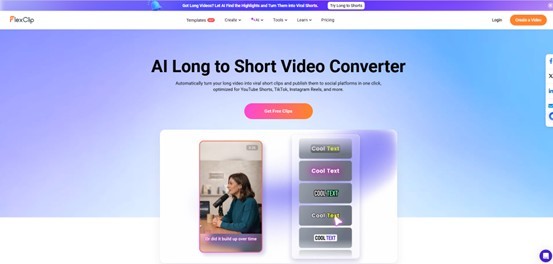
In the era of TikTok, Instagram Reels, YouTube Shorts, and LinkedIn video snippets, long-form content alone is no longer enough. Creators, marketers, educators, podcasters, and brands are under constant pressure to repurpose existing content into engaging short-form clips that can capture attention within seconds.
That is exactly where FlexClip AI Long Video to Short Video Converter positions itself. Rather than forcing creators to manually scrub through hours of footage, trim timelines, add captions, and reformat for vertical platforms, FlexClip promises a streamlined AI-powered workflow capable of turning lengthy videos into multiple viral-ready shorts automatically.
After extensively analyzing the platform, its workflow, AI features, editing flexibility, and real-world usability, here is my in-depth professional review of this increasingly popular AI video clipping tool.
What Is FlexClip AI Long Video to Short Video?
FlexClip is already well known in the browser-based video editing space for offering beginner-friendly editing tools combined with powerful AI capabilities. Its AI Long Video to Short Video feature focuses specifically on content repurposing.
The tool allows users to:
- Upload long videos or paste YouTube links
- Automatically detect highlight moments
- Convert footage into vertical short-form videos
- Generate animated subtitles
- Reframe speakers intelligently
- Publish clips directly to social media platforms
According to FlexClip, the tool supports content such as podcasts, interviews, tutorials, webinars, livestreams, product demos, and educational videos.
This positions it directly within one of the fastest-growing segments of AI video production: automated short-form content repurposing.
First Impressions and User Experience
One of the strongest aspects of FlexClip’s ecosystem has always been accessibility, and this tool continues that philosophy.
The interface is clean, modern, and highly approachable even for non-editors. Unlike traditional editing software that overwhelms users with timelines and advanced controls, FlexClip simplifies the process into three straightforward steps:
- Upload or paste a video
- Let AI generate clips
- Edit and publish
This simplicity is particularly valuable for creators managing large volumes of content.
For example, podcast creators often spend several hours per week manually creating social media clips. FlexClip compresses much of this workflow into minutes through automation.
The browser-based workflow is also convenient because there is no software installation required. Everything runs online, making it accessible across different operating systems.
AI Highlight Detection: Surprisingly Efficient
The core feature of any AI clipping platform is its ability to identify engaging moments automatically.
FlexClip’s AI analyzes the uploaded video and extracts what it considers the most valuable highlights. These are then transformed into shorter clips optimized for platforms like TikTok, Instagram Reels, and YouTube Shorts.
In practical use, this functionality works best with:
- Podcasts
- Interviews
- Educational content
- Commentary videos
- Webinars
- Product demonstrations
The AI tends to prioritize:
- Strong speaking moments
- Emotional emphasis
- Conversational hooks
- Clear narrative transitions
This mirrors broader industry trends in AI-assisted content repurposing. Discussions across creator communities consistently emphasize how automated clipping tools significantly reduce editing time while improving publishing consistency.
While FlexClip’s AI is not perfect — occasional clips may require manual refinement — the initial selection quality is surprisingly usable for a web-based editor.
Compared to fully manual editing, the time savings are substantial.
Smart Reframing and Speaker Detection
One of the most technically impressive features is the AI speaker detection and reframing system.
Short-form platforms prioritize vertical video formats, which creates a challenge for traditional horizontal footage. Many AI clipping tools simply crop the center of the screen, often resulting in awkward framing.
FlexClip takes a smarter approach.
The AI automatically tracks active speakers and dynamically adjusts framing based on the conversation layout. For example:
- Solo speakers are auto-centered
- Two-person conversations may switch to split-screen layouts
- Important speaking moments remain visually focused
This greatly improves the final viewing experience and reduces the need for manual repositioning.
For podcasters and interview creators especially, this feature alone can eliminate a large amount of repetitive editing work.
Auto Captions and Subtitle Translation
Captions are no longer optional in short-form video.
Modern viewers frequently consume content muted, and captions significantly improve watch time and retention.
FlexClip automatically generates animated subtitles synchronized with speech. The subtitles are visually optimized for social platforms and help maintain viewer engagement.
More importantly, the platform also supports subtitle translation for multilingual distribution.
This is particularly useful for:
- International creators
- Global brands
- Educational channels
- Agencies managing multi-region campaigns
The growing importance of multilingual short-form content is becoming increasingly evident across AI media research and creator workflows. Academic research on AI-assisted teaser generation also highlights how automation reduces cognitive editing load while improving publishing efficiency.
Built-In Editing Flexibility
One concern with many AI video clipping tools is that they often behave like “black boxes.” You upload a video, receive clips, and have limited control afterward.
FlexClip avoids this limitation by integrating its traditional video editor directly into the workflow.
After AI generates clips, users can still:
- Trim scenes manually
- Edit captions
- Add branding elements
- Insert transitions
- Customize layouts
- Add social widgets
- Fine-tune timing
This hybrid AI + manual editing approach is important because fully automated editing rarely achieves perfect results across all content types.
FlexClip strikes a strong balance between automation and creative control.
Social Media Publishing Workflow
Another standout feature is direct social publishing.
Instead of downloading clips individually and re-uploading them to each platform, users can distribute content directly to social channels after editing. The AI can even assist with generating titles and descriptions.
For agencies, creators, and marketing teams producing content at scale, this workflow optimization can significantly improve productivity.
The modern creator economy increasingly rewards consistency and publishing frequency. Tools that reduce operational friction become highly valuable in real-world content pipelines.
Performance and Limitations
No AI tool is flawless, and FlexClip does have limitations.
Strengths
- Extremely beginner-friendly
- Fast processing workflow
- Effective subtitle generation
- Good speaker tracking
- Excellent for podcasts and interviews
- Integrated editor adds flexibility
- Browser-based convenience
- Strong social media orientation
Weaknesses
- AI clip selection occasionally lacks context
- Advanced editors may want deeper manual controls
- Complex cinematic footage is less suitable
- Viral prediction is not always accurate
- Some clips still require human polishing
However, these limitations are common across the entire AI clipping category. Even highly discussed competitors like Opus Clip and Vizard still require human review for optimal results.
Final Verdict
FlexClip AI Long Video to Short Video Converter succeeds because it focuses on practicality rather than hype.
Instead of attempting to replace creators entirely, it accelerates one of the most time-consuming parts of modern content production: repurposing long-form videos into short-form assets.
For creators producing podcasts, educational content, webinars, commentary videos, or interviews, this tool can dramatically reduce editing workload while improving publishing consistency across social platforms.
Its combination of:
- AI highlight detection
- Smart reframing
- Automated captions
- Built-in editing
- Social publishing integration
makes it one of the more balanced and accessible AI clipping solutions currently available.
While professional editors working on cinematic productions may still prefer advanced desktop software, FlexClip is exceptionally well positioned for the fast-moving creator economy where speed, volume, and platform optimization matter most.
For creators seeking an efficient AI-powered workflow without the steep learning curve of traditional editing software, FlexClip’s AI Long Video to Short Video tool is absolutely worth trying.

What's your reaction?
You may also like
-

Why Small Roofing Problems Can Become Harder to Diagnose When Homeowners Delay Repairs
-
Planning a Stair Lift for Shared Homes Without Disrupting Everyday Staircase Use
-
Managing Household Waste During Large Decluttering Projects Without Creating New Clutter
-
How to Plan Impact Door Installation Around Security, Access, and Everyday Household Routines
-
How Commercial Roofing Maintenance Planning Helps Property Managers Track Roof Conditions
-
Designing Privacy Around Street-Facing Windows Without Giving Up Useful Natural Daylight










Comments
0 comment