




Introduction
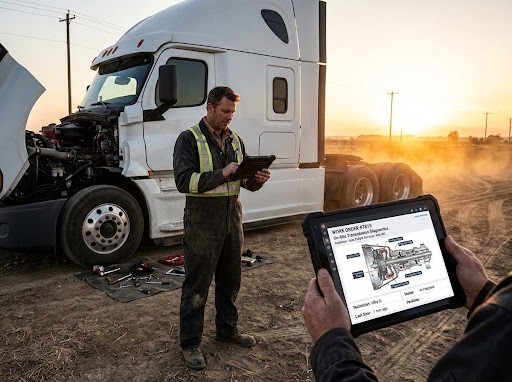
Running a mobile truck repair business is different from operating a traditional repair shop.
Instead of bringing vehicles into a service bay, technicians travel to customer locations, highways, job sites, warehouses, and fleet yards to complete repairs.
That flexibility is valuable for customers, but it creates unique management challenges.
A dispatcher needs to know which technician is available. A mechanic needs access to vehicle history while working in the field. Customers want updates about repair progress. Managers need accurate records of labor, parts, and completed work.
When these processes are managed through phone calls, paper forms, and spreadsheets, mistakes become common.
A technician may arrive without the correct part. A repair may be completed but not properly documented. An invoice may be delayed because information is missing.
That is where mobile truck repair software helps.
A dedicated mobile repair management system connects field technicians, office teams, customers, and fleet managers on a single platform.
It allows businesses to manage service calls, repair orders, technician schedules, inventory, and billing while keeping operations organized from anywhere.
What Is Mobile Truck Repair Software?
Mobile truck repair software is a digital management system designed for truck repair businesses that provide on-site maintenance and emergency repair services.
It helps mobile repair companies manage their complete workflow without relying on a physical repair shop.
Common features include:
- Mobile work orders
- Technician scheduling
- Dispatch management
- GPS-based service tracking
- Customer records
- Vehicle repair history
- Digital inspections
- Parts tracking
- Estimates and invoices
- Payment processing
- Maintenance reports
The software gives field technicians access to the information they need while allowing managers to monitor operations remotely.
Why Mobile Truck Repair Businesses Need Better Management Tools
Mobile repair companies handle several moving parts every day.
A typical day may involve:
- Emergency roadside calls
- Fleet maintenance visits
- Multiple technicians working remotely
- Different customer locations
- Changing schedules
- Parts transportation
Managing all of this manually creates problems such as:
- Slow response times
- Poor communication
- Incorrect scheduling
- Missing repair information
- Delayed invoices
- Difficulty tracking technician productivity
Mobile truck repair software helps businesses create a connected workflow where information moves quickly between the office and the field.
How Mobile Truck Repair Software Improves Daily Operations
1. Simplifies Dispatching and Technician Scheduling
For mobile repair businesses, sending the right technician to the right location at the right time is critical.
Poor scheduling can lead to:
- Longer customer wait times
- Unnecessary travel
- Technician downtime
- Missed service appointments
Mobile repair software helps dispatchers see:
- Available technicians
- Current assignments
- Customer locations
- Job priorities
- Expected completion times
Managers can assign jobs more efficiently and reduce unnecessary delays.
The result is faster service response and better technician utilization.
2. Gives Technicians Access to Information in the Field
Mobile technicians often work away from the office.
Without digital access, they may need to call the shop repeatedly for information.
Software allows technicians to access:
- Customer details
- Truck history
- Previous repairs
- Service instructions
- Parts information
- Work order details
Whether a technician is repairing a truck at a warehouse or on the roadside, they have the information needed to complete the job properly.
3. Creates Digital Work Orders Anywhere
Paperwork orders are difficult to manage when technicians are constantly moving.
Important details can be lost:
- Repair notes
- Customer approvals
- Labor hours
- Parts used
- Inspection results
Mobile truck repair software allows technicians to create and update work orders directly from their mobile devices.
They can:
- Add repair descriptions
- Upload photos
- Record labor time
- Add parts used
- Capture customer signatures
- Update job status
This creates accurate records without additional paperwork.
4. Improves Emergency Repair Response Times
Many mobile truck repair businesses handle urgent breakdown situations.
When a commercial truck is stopped, every minute matters.
Software improves response efficiency by helping teams:
- Receive service requests quickly
- Identify available technicians
- Locate nearby resources
- Track job progress
- Communicate updates
Faster coordination helps trucks return to operation sooner.
5. Tracks Vehicle Repair History
Commercial trucks often require repeated maintenance.
Without proper records, technicians may not know:
- Previous problems
- Recent repairs
- Replaced components
- Maintenance schedules
Mobile truck repair software stores complete vehicle histories.
Records can include:
- Vehicle information
- Mileage
- Repair history
- Inspection results
- Parts replacement
- Maintenance dates
This helps technicians diagnose problems faster and provide better service.
6. Helps Manage Parts and Mobile Inventory
Carrying the right parts is one of the biggest challenges for mobile repair companies.
A technician arriving without the required component can delay the entire repair.
Software helps manage:
- Technician inventory
- Parts availability
- Used components
- Purchase records
- Stock levels
Managers can track what parts are available in each service vehicle and prepare technicians before dispatching them.
7. Improves Customer Communication
Customers want updates when their trucks are being repaired.
Poor communication can create frustration, especially for fleet operators managing multiple vehicles.
Mobile repair software helps businesses provide:
- Repair status updates
- Digital estimates
- Approval requests
- Completion notifications
- Service records
Customers have better visibility without needing to call for updates repeatedly.
8. Makes Billing Faster and More Accurate
Mobile repairs involve many details:
- Technician hours
- Travel time
- Parts used
- Emergency service fees
- Additional repairs
Manual invoicing can cause delays and mistakes.
Software connects completed work directly with billing.
Businesses can create invoices using:
- Recorded labor
- Installed parts
- Completed services
- Customer approvals
This improves accuracy and helps companies receive payments faster.
Manual Mobile Repair Management vs Software-Based Management
| Task | Traditional Method | Mobile Truck Repair Software |
| Dispatching | Phone calls and messages | Digital job assignment |
| Work Orders | Paper forms | Mobile digital records |
| Technician Tracking | Manual updates | Real-time visibility |
| Vehicle History | Scattered documents | Complete repair records |
| Parts Tracking | Manual inventory | Digital stock management |
| Billing | Delayed paperwork | Faster automated invoicing |
Benefits of Using Mobile Truck Repair Software
Mobile repair businesses can achieve:
- Faster customer response
- Better technician productivity
- Reduced paperwork
- Improved scheduling
- Accurate repair documentation
- Faster invoicing
- Better customer relationships
- Increased service capacity
The biggest advantage is control. Managers can understand what is happening across the entire operation, even when technicians are working in different locations.
Who Uses Mobile Truck Repair Software?
This software is useful for:
- Mobile diesel mechanics
- Roadside truck repair companies
- Fleet maintenance providers
- Emergency repair services
- Commercial vehicle technicians
- Transportation companies
- Construction equipment service teams
Any business providing repair services outside a traditional shop can benefit from mobile repair management tools.
FAQs
What is mobile truck repair software used for?
It helps mobile repair businesses manage dispatching, work orders, technicians, vehicle records, inventory, and billing.
Can technicians use the software from their phones?
Yes. Many systems are designed for mobile devices so technicians can update jobs while working in the field.
Does mobile repair software help with emergency breakdowns?
Yes. It improves dispatching, communication, and technician coordination, helping businesses respond faster.
Can it track customer and vehicle history?
Yes. Businesses can store complete repair records and access them during future service calls.
Is mobile truck repair software useful for small businesses?
Yes. Small mobile repair companies can use it to organize operations and improve customer service without adding administrative workload.
Conclusion
Mobile truck repair businesses succeed because they provide fast service where customers need it most. However, managing technicians, repairs, parts, and customer communication without the right system can become difficult.
Mobile truck repair software helps field service teams stay organized by connecting dispatchers, technicians, customers, and repair information on a single platform.
By replacing manual processes with digital management, businesses can respond faster, complete more repairs, reduce paperwork, and improve customer satisfaction.
For mobile repair companies looking to grow, the right software is not just a convenience. It is a tool for building a more efficient and profitable operation.
Where Fullbay Fits
Fullbay helps mobile truck repair businesses manage field operations with tools for scheduling, digital work orders, technician tracking, inventory management, invoicing, and customer communication.
With a connected repair management system, mobile teams can spend less time managing paperwork and more time keeping trucks on the road.

What's your reaction?
You may also like
-

How Car Accident Lawyers Help Injured Victims Recover Fair Compensation
-
How to Respond After Being Charged With Assault Family Violence
-
7 Steps San Angelo Injury Victims Should Take After an Accident
-
A Guide to Crafting Authentic and Professional AI Marketing Content
-
What Jordan Traffic Rules Should Rental Car Drivers Follow?
-
Move-Out Cleaning Becomes a Different Job Once the Furniture Is Gone









Comments
0 comment