




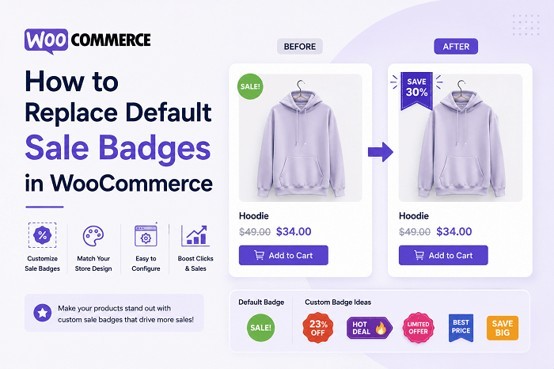
Your WooCommerce store's default sale badge is generic. It says "Sale!" in a dull red box. Every store looks the same. Your customers have seen it thousands of times. It doesn't stand out. It doesn't grab attention. It doesn't feel aligned with your brand.
That's a missed opportunity. Product badges are one of the few design elements that sit directly on product images. They're visible in search results, category pages, and shopping feeds. They influence purchasing decisions. A well-designed badge draws the eye and creates urgency. A generic badge gets ignored.
The question is how to actually replace those default badges without losing your mind in the process. You have options, but they come with varying levels of complexity, customization, and maintenance headaches.
Default WooCommerce Sale Badges
WooCommerce's default sale badge works. It shows up on sale items. It does the basic job. But that's all it does.
The default badge has severe limitations. You can't customize the text beyond "Sale!" You can't change the design. You can't create different badges for different promotions. You can't schedule them. You can't target them to specific products or categories. You're stuck with one generic badge for every sale item in your store.
This matters because visual hierarchy influences behavior. Customers browsing your shop spend seconds deciding what to click. That split-second decision is influenced by what catches their eye. A branded, eye-catching badge creates urgency and draws attention. A generic badge blends into the background.
You're also leaving money on the table. Customers don't see your brand personality in that badge. It could say anything. It could be from any store. You're not using a prominent real estate opportunity to reinforce who you are.
The solution is replacing those default badges with something custom. The challenge is figuring out how without spending weeks on development or dealing with complex workarounds.
Exploring Your Options for Replacing Sale Badges
When you start looking for alternatives, you find several approaches, each with its own friction points.
The Custom Code Route
Some store owners think they can just code a solution. Add some PHP to functions.php, hook into WooCommerce's badge rendering, and display custom badges. It's theoretically possible.
In practice, it's complicated. You need to understand WooCommerce's product display hooks. You need to handle different product types (simple, variable, grouped). You need to manage badge positioning on images. You need to style them so they look good on different image sizes. You need to test across products, categories, and different scenarios.
Then you have to maintain it. When WooCommerce updates, your code might break. When WordPress updates, something might need adjustment. You're now responsible for ongoing technical debt. Most store owners don't have the technical knowledge for this, and even those who do find it's not worth the time investment.
Basic WooCommerce Plugins
You can find simple plugins that let you customize the default badge text. Change "Sale!" to "Limited Time Offer" or "Special Deal." It's an improvement, but it's surface-level.
These basic plugins typically offer text customization and maybe a color change. That's about it. You still get one badge that displays the same way on every sale item. You can't create different badges for different products. You can't use countdown timers. You can't schedule badges for specific dates. You can't set up rules like "show this badge only on products under $50."
The limitation is fundamental. These plugins work with WooCommerce's default badge system, so they're limited by what that system allows. You're constrained by the original design.
CSS-Only Tweaks
Some people try to customize badges purely through CSS. Hide the default badge, add a new one through CSS styling, try to make it look branded.
This approach is fragile. CSS solutions don't scale well. They break on different screen sizes. They don't adapt to product data. They're not dynamic. You end up with something that works sometimes but not consistently. Customers on mobile devices might see nothing. Different product categories might display incorrectly.
Plus, you can't do anything sophisticated. No countdown timers. No dynamic pricing data. No conditional logic. You're limited to static styling. Every time you want a new badge design, you're writing new CSS rules and hoping they work across all devices.
DIY Image Overlays
Some stores create badge images and try to overlay them on product images using plugins or custom code. Upload badge images, position them, hope they display correctly on all product images.
The problem is alignment and consistency. Product images have different dimensions. Some images have the subject positioned center, others off to the side. A badge positioned for one image looks wrong on another. You end up with badges that look misaligned on half your products.
You also can't do anything dynamic. If you want to show the discount percentage, you have to manually update badge images when prices change. That's not scalable for any store with more than a few products. You're constantly managing badge images and manually updating them.
Product Badges and Labels for WooCommerce: The Complete Solution
This is where WooCommerce product badges by Extendons enters. It's built specifically to solve this problem comprehensively. Instead of working around WooCommerce's limitations, the plugin replaces the entire badge system with purpose-built functionality.
Three Badge Types for Different Situations
The plugin includes three distinct badge formats in WooCommerce product badges, each serving different promotional needs.
Text badges let you create fully customized badges with rich text editing. Choose fonts, colors, sizes, bold, italic, alignment. Write any text you want. But here's the powerful part: use dynamic pricing tags. Write something like "Save {percentage}% Off" and the plugin automatically pulls the live discount percentage from each product and inserts it. Write "{saleprice}" and it shows the actual sale price. This means one badge displays different content for different products automatically.
You set the badge text once and it handles everything. If you reduce a product's sale price, the badge updates automatically. The discount percentage adjusts without manual intervention. This is impossible with basic plugins or CSS tweaks. You're not manually updating badges. The data updates in real-time as prices change.
Image badges let you use professionally designed badge images. The product badge WooCommerce plugin includes a predefined library of popular badges like "Buy 1 Get 1 Free," "BOGO Sale," "Limited Edition," and many others. Click one and it's applied. If you want something completely custom, upload your own badge image from your media library. Scale it using a percentage slider. Position it precisely using drag and drop. The plugin handles all the technical complexity of overlaying images on product images correctly across all product types.
Countdown badges display a live timer showing exactly how much time remains. "Sale Ends In: 2 days, 14 hours, 30 minutes." The timer counts down in real-time on the product page. When time expires, you choose what happens: hide the badge, replace it with another badge, or leave it visible. This creates genuine urgency. It's not a static label saying the sale is happening. Customers see the seconds ticking away. That creates psychological pressure that converts browsers into buyers.
Sophisticated Targeting and Display Rules
This is where the product badge WooCommerce solution becomes genuinely powerful. You create display rules that determine which badges appear on which products automatically.
You can target by almost anything. Show a badge on all products in a specific category. Show a badge only on products that are currently on sale. Show a badge only on products priced between $50 and $200. Show a badge on products with specific tags. Show a badge only on featured products. Show a badge only when stock is below a certain quantity.
You can combine conditions. "Show this badge on products in the 'Summer' category that are on sale and priced above $75." Create multiple rules, each with different conditions and different badges. The logic runs automatically. The right badge displays on the right product based on the conditions you set.
This level of targeting is impossible with basic badge plugins. You're not limited to "show on all sales." You can have completely different badges for different promotional strategies. A badge showing clearance items. A different badge showing new arrivals. Another badge showing bestsellers. Each badge appears on different products automatically based on rules you define.
Schedule Badges for Specific Periods
You can schedule badges to appear only during specific date ranges. Set up a holiday badge to display only during the holiday season. Set up a flash sale badge to display only during your 48-hour flash sale. The badge appears automatically on the dates you set and disappears when the period ends.
This is perfect for seasonal promotions, limited-time offers, or flash sales. You set it up once and it handles itself. No need to remember to activate or deactivate badges manually. The system is on autopilot.
Role-Based Visibility
Show different badges to different customer types. Maybe wholesale customers see different promotions than retail customers. Maybe VIP members see exclusive badge promotions. Maybe you want to show a "Member Exclusive" badge only to logged-in users.
The plugin lets you control badge visibility by user role. Set a badge to display only to wholesale users, or only to members, or only to guests. Same product, different badges for different customer types based on who's viewing. This enables sophisticated merchandising strategies you simply can't do with default WooCommerce badges.
Real-Time Live Preview
As you configure each badge, you see a live preview of exactly how it will look. Adjust the position by dragging the badge directly on the preview. Change the size and see the update instantly. Adjust opacity and rotation and watch it change. This eliminates guesswork. You see exactly what customers will see before you save it.
Detailed Customization Without Coding
You control everything through the interface. Size, padding, margin, border radius, opacity, 3D rotation. Customize badge positioning in pixels or percentage. Adjust every visual aspect to match your brand perfectly.
The drag-and-drop interface makes it intuitive. You don't need to code anything. You don't need to understand CSS or WooCommerce hooks. You configure through forms and see results instantly. The complexity is handled behind the scenes.
Real-World Implementation Examples
Let me show you how this works in practice with different store types using WooCommerce product badges.
Seasonal Fashion Store
You sell seasonal clothing. In summer, you run a "Summer Collection" promotion. In winter, "Winter Clearance." You create two badges: one for summer, one for winter. Set up display rules that target products by category and date range.
June through August: The summer badge displays on all products in the "Summer Collection" category. September through May: The winter badge displays on products in "Winter Clearance" that are on sale.
You set this up once and it runs automatically. Customers see the right badge at the right time. You don't manually update anything. The system handles the seasonal logic.
Electronics Store with Dynamic Pricing
You sell electronics with varying discounts. Some products have 10% off, others 30% off. Instead of having one generic "Sale!" badge for everything, you create a text badge that says "Save {percentage}% Off!"
Now every product shows its actual discount percentage. A product with 15% off shows "Save 15% Off!" A product with 40% off shows "Save 40% Off!" The badge reflects reality. Customers see the actual value they're getting. Create another rule: any product over $500 on sale gets a "Limited Quantity Available" countdown badge.
Gift Shop with Flash Sales
You run weekly flash sales. Monday mornings, you have a 24-hour flash sale on specific products. Create a countdown badge that says "Flash Sale Ends In:" and set it to count down 24 hours. Set the rule to display only on products tagged "Flash Sale" and only during your sale window.
Customers see a countdown timer on sale products. The timer creates real urgency. When the 24 hours end, the badge automatically disappears and is replaced with your regular sale badge. No manual intervention needed.
Multi-Category Store with Role-Based Promotions
You have both retail and wholesale customers. Wholesale customers get better pricing. Create a "Wholesale Price" badge that shows only to wholesale user role. Create a "Retail Special" badge that shows only to retail customers.
Same products, completely different promotional messaging based on who's looking. Retail customers see your standard promotions. Wholesale customers see their exclusive pricing and offers.
Why This Matters for Your Bottom Line
Custom WooCommerce product badges aren't just aesthetic improvements. They directly impact business metrics.
Conversion rates improve when you use attention-grabbing, prominent badges. Studies show that visual urgency cues increase clicks and purchases. A generic "Sale!" badge doesn't create urgency. A countdown timer badge does. A badge showing "Save 40%" is more compelling than "Sale!"
Average order value increases when you use badges strategically. Promote high-margin products with prominent badges. Show limited quantity badges on items you want to move. Use badges to draw attention to bundles and special offers. Targeted badges drive customers toward your most profitable products.
Brand perception improves with branded badges. Your badges are your design language on the most visible real estate. Professional, branded badges signal quality. Generic badges signal laziness. Customers notice.
Customer psychology responds to urgency. Countdown badges genuinely create urgency. Discount percentage badges clarify value. Limited quantity badges trigger fear of missing out. These aren't manipulative. They're honest communication about what you're offering. They just need to be communicated effectively, which custom product badge WooCommerce solutions enable.
Seasonal relevance matters. When you can schedule badges for specific dates, you reinforce seasonal messaging. Halloween badges appear during October. Holiday badges appear in December. Spring sale badges appear in March. Your store feels current and responsive to the season. This subtle communication builds customer confidence.
Implementation Path
If you're using the default WooCommerce badge system now and frustrated with its limitations, the path forward is clear. The plugin handles the complexity that makes other solutions impractical.
Install the plugin. Create your badges. Set up your display rules. That's it. You're not writing code. You're not manually updating badge images. You're not dealing with misaligned overlays. You're using a purpose-built tool designed specifically for this problem.
Your store will immediately look more professional. Your badges will be fully aligned with your brand. Your promotions will be communicated effectively. Your customers will see compelling reasons to take action.
That's the difference between fighting with WooCommerce's limitations and having a tool that was built to solve this exact problem.

What's your reaction?
You may also like
-

10 Proven Strategies Accelerated Growth Advisors Recommend for Every MCA Firm
-
How Imaging Services Help Diagnose Medical Conditions
-
How to Plan Stress-Free Airport Transportation for Families With Young Children
-
Smart Business Growth: How to Scale Customer Support Without Increasing Overhead
-
Essentials Hoodie for Everyday Layering: Stylish Outfit Ideas for Every Season
-
Cloudways BFCM 2026: 80% OFF for 2 Months + Unlimited Migrations









Comments
0 comment