




Upgrading to a new iPhone is exciting, but the thought of transferring all your data - the photos you've taken over the years, important information, and personalized settings, you may feel a bit overwhelming. You want your new device to instantly make you feel "belonging" without the hassle. While Apple offers built-in transfer tools, they often have some flaws: slow wireless transfers, lack of selectivity when cloning data, or reliance on limited iCloud storage. This is the difference that a specialized, professional iPhone tansfer tool like FoneTool can bring to help you complete iPhone to iPhone migration in a faster, smarter, and more controlled way.
Why choose FoneTool for direct data transfer between iPhones?
FoneTool makes the upgrade process easier by enabling a direct, wired connection between your old and new iPhones through your computer. This avoids many of the inconveniences common with traditional methods:
l Fast Transfer Speeds: Transfer over a direct USB connection far faster than relying on Wi-Fi to transfer large amounts of photo libraries and files in minutes instead of hours.
l Precise Selectivity: Unlike other system-level tools, FoneTool does not copy everything but allows you to select exactly what you want to transfer. Just select the photo album, message group, or document you need to clear out the old clutter for a fresh start.
l Full reliability: The wired connection ensures a stable transmission process, without the risk of interruptions that can arise from wireless transmission.
l Data Quality Preservation: All your data, including high-resolution photos and 4K videos, is transmitted in original quality without compression.
Ideal application scenarios:
This approach is especially useful for the following user groups to see if you are part of it:
Ø The annual iOS version upgrader who seeks a quick and dependable migration year after year.
Ø This media premium edition has a huge library of photos and videos, and uploading them to iCloud can be time-consuming.
Ø Organized users see a new phone as an opportunity to clean up old data and transfer important information that is just needed.
How to transfer data from iPhone to iPhone with FoneTool
The iPhone data transfer process was originally designed to be simple and easy to implement:
Step 1. Install FoneTool on your PC. Using two USB cables, connect both your old (source) and new (destination) iPhones to the computer.
Step 2. Launch FoneTool software navigate to the "Phone Transfer" in the main interface, and select the "iPhone to iPhone" transfer mode.
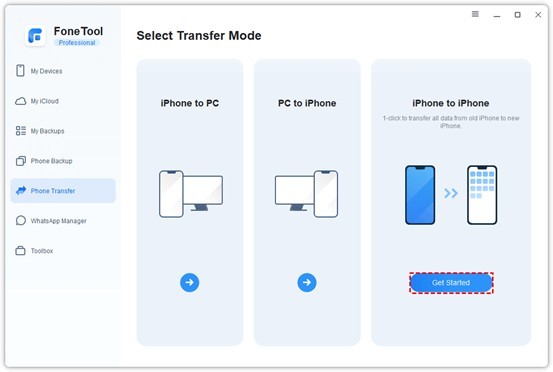
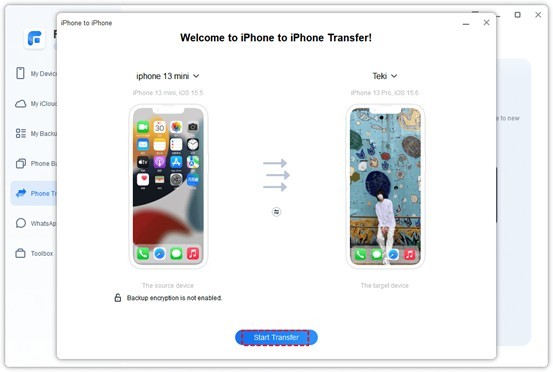
Step 3. The software will migrate your data from one iPhone to another in one go, and you need to make sure that the source and destination devices are correct.
Step 4. Click "Start Transfer", you just need to wait for FoneTool to move your data between the two iOS devices efficiently, and when it is done, your new iPhone will reboot and be ready to use all the selected data.
Beyond transfer - FoneTool is a complete iPhone data manager
Despite its excellent transfer capabilities, FoneTool is also a comprehensive iPhone management software. It also allows you to:
ü Create Flexible Backups: Go beyond traditional full device backups. FoneTool's selective backup feature allows you to select specific data types, like backing up only your albums, WhatsApp messages, or contacts, and back them up to your computer. This saves storage space and gives you precise control over what you want to keep and recover.
ü Manage WhatsApp Data: Securely back up or directly transfer your complete WhatsApp chats and attachments between devices.
ü

What's your reaction?
You may also like
-

7 Tips for acid reflux chest pains 24 7 emergency room Fast
-
How to Choose the Right Brass Tub for Your Bathroom
-
How Enterprise Software Enhances Team Collaboration
-
7 Powerful Benefits of Using a Flashcard Template for Learning
-
7 Smart Tips for Economy Car Rental Jordan Travelers
-
7 Ways Digital Pathology Is Transforming Laboratory Efficiency














Comments
0 comment