




Anyone who has managed an e-commerce store knows this cycle: hire a photographer, wait on a studio slot, pay for editing, upload assets, realize half the shots don't match platform specs, and start over. The question sellers are now asking isn't whether AI can help — it's exactly how much of that chain it can own. Banana Pro AI sits at the center of that question, and the answer is more complete than most people expect.
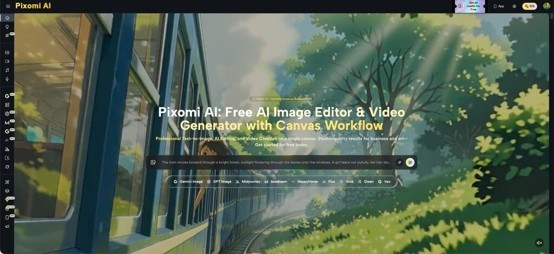
I. What Banana Pro AI Can Do Before You Open a Lightroom File
The most valuable thing to understand about Banana Pro AI is that it doesn't just polish finished images — it can replace entire early-stage production decisions.
- Generating Product Visuals From a Description
Traditional product photography starts with a creative brief, a lighting setup, physical props, and a studio that costs money by the hour. With Banana Pro AI's Text to Image engine, sellers can generate photorealistic product mockups from a written description before a single box is shipped to a photographer. The model produces output up to 4K resolution, with proper lighting, shadow behavior, and surface texture that rivals controlled studio shots. For DTC brands testing new colorways or seasonal packaging variations, this alone can eliminate dozens of exploratory shoots per quarter.
- Transforming Raw Shots With Image-to-Image Editing
Sellers who already have raw product photos aren't left out. The Image to Image transformation feature takes an existing photo and modifies it — swapping backgrounds, adjusting lighting tone, or repositioning the product in a scene — without touching the actual item. The AI understands spatial relationships well enough that shadows fall correctly and colors remain calibrated across variations.
II. Background Removal, White-Background Compliance, and Platform Specs
Amazon, Walmart, Etsy, and Shopify all have their own main image requirements — and the biggest bottleneck for multi-channel sellers isn't the shoot itself, it's the post-production cleanup.
- Automatic Background Removal That Looks Photographed
Banana Pro AI automates background removal and generates clean white-background images that meet major marketplace standards out of the box. The process doesn't just crop — it generates soft, natural shadows that keep images looking photographed rather than clipped, a distinction that matters for conversion.
- Batch Processing for Full Catalogs
For sellers running dozens of SKUs, the batch generation feature allows multiple product variations to be processed simultaneously, with consistent lighting and color treatment across the entire set. That kind of SKU consistency is what used to require a full-day studio session.
III. Scene Generation and Lifestyle Photography Without a Set
The gap between a white-background listing image and a lifestyle shot is also the gap between a product that sits and one that sells. Lifestyle imagery drives emotional engagement — buyers want to see the product in context, not floating on a white void.
- Plain-Language Scene Descriptions
Banana Pro AI lets sellers describe a scene in plain language and place their product directly into it. A skincare bottle can appear on a marble bathroom shelf. A backpack can sit against a mountain trail backdrop. A kitchen gadget can land on a styled countertop. None of these require props, location fees, or a photographer.
- Brand Color and Finish Accuracy Across Scenes
The model maintains color accuracy throughout — brand colors, packaging details, and surface finishes are preserved even when the surrounding scene changes. For private-label sellers protecting a brand identity, this matters as much as resolution.
IV. Retouching, Defect Removal, and Detail Enhancement
Post-production retouching is the phase of the workflow that traditionally requires the most skilled labor. Dust on product surfaces, inconsistent lighting between shots, color casts from studio flash — fixing these has always meant time in Photoshop with someone who knows what they're doing.
- Natural Language Retouching Instructions
Banana Pro AI handles this with natural language instructions. Describe what needs to change — "remove the scratch from the upper left corner," "balance the highlights on the lid," "clean the background edge around the handle" — and the model interprets the instruction and applies it while leaving the rest of the image intact. Retouching that would take a skilled editor an hour now takes a sentence.
- Non-Destructive Edits That Belong to the Photo
The AI editing layer preserves the original composition and lighting structure, so corrections feel like they belong to the photo rather than sitting on top of it. There's no heavy-handed AI stamp that makes the result look processed — edits are integrated, not overlaid.
V. The Canvas Workflow: Chaining Steps Into a Repeatable Pipeline
For sellers managing a full catalog refresh or running ongoing creative production, individual image edits still add up. The real productivity shift happens when multiple steps are connected into a single repeatable workflow.
- Node-Based Visual Studio
Banana Pro AI's Canvas Workflow is a node-based visual workspace where individual AI steps — image generation, editing, style transfer, background removal, video creation — are connected into a pipeline on an infinite canvas. A seller can build a workflow where a raw product photo enters one end and exits as a white-background listing image, a lifestyle scene variant, and a platform-formatted social asset simultaneously.
- Reusable Pipelines for Teams
The same pipeline runs the next time with a different product, with no setup time. Creative agencies handling large campaigns can save reusable workflows and share them across team members, eliminating the manual coordination between tools that inflates production hours.
VI. From Still Images to Video Ads — In the Same Workspace
The newest demand in e-commerce creative is short-form video: TikTok ads, Instagram Reels, product demo clips. These have historically sat in an entirely separate production track with separate budgets and timelines.
- Video Generation Built Into the Same Tool
Banana Pro AI integrates video generation directly alongside image tools. Using models including Veo 3, Veo 3.1, and Seedance, sellers can animate product images, create product demo clips, or generate full video ads from text descriptions — all within the same workspace where the images were created.
- No File Exports, No Tool Switching
The Canvas Workflow connects image output nodes directly to video generation nodes, meaning a finished product photo can feed a short video ad without any file export, re-upload, or tool switching. For small teams producing content across channels, this kind of consolidation has a direct impact on turnaround time.
VII. Output Quality, Commercial Rights, and What Sellers Actually Get
None of this matters if the output can't be used commercially or doesn't meet production standards.
- 4K Output With Full Commercial Usage Rights
Banana Pro AI generates images up to 4K with full commercial usage rights included at no extra cost. There are no licensing restrictions and no hidden fees — every image created is owned entirely by the seller and can be used in advertising, print, marketplaces, social media, or any commercial application.
- Free Tier With No Payment Commitment
A free tier is available to start without any payment commitment, making it accessible to sellers at every scale — from a one-person Etsy shop testing the tool to an agency managing hundreds of SKUs simultaneously.
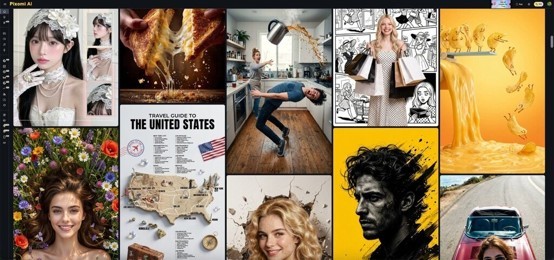
The Real Shift
The question of "how much can AI replace?" is the wrong frame. A better question is: where is the work happening now that doesn't need to be? Renting studios, waiting on edits, running assets through five separate tools, paying for reshoots when specs change — these costs are structural, not creative. What Banana Pro AI changes is that creative decisions can now be made before committing budget to production, and production can be scaled without scaling headcount.
The sellers who move fastest aren't the ones with the biggest photography budgets. They're the ones who stopped treating creative production as a fixed cost and started treating it as a variable they could control. That control is now available to anyone willing to use it.

What's your reaction?
You may also like
-

10 Proven Strategies Accelerated Growth Advisors Recommend for Every MCA Firm
-
How Imaging Services Help Diagnose Medical Conditions
-
How to Plan Stress-Free Airport Transportation for Families With Young Children
-
Smart Business Growth: How to Scale Customer Support Without Increasing Overhead
-
Essentials Hoodie for Everyday Layering: Stylish Outfit Ideas for Every Season
-
Cloudways BFCM 2026: 80% OFF for 2 Months + Unlimited Migrations










![How to Utilize the Unallocated Space [2 Ways]](https://www.wongcw.com/upload/media/posts/2022-05/13/how-to-utilize-the-unallocated-space-2-ways_1652442328-s.jpg)

Comments
0 comment